Compare Prices checked

The Jobber alternative for the billing.

Jobber runs the schedule, from $49 a month, with payment reminders from $139. If billing is the job, BillGrid is $10 a month with reminders included: every customer invoiced in one sitting, a service address on each invoice, a stack of checks recorded at once.

What you’d pay each month

List prices
You also need
Add what clients pay you online
Clients pay by
BillGrid   /mo
Jobber   /mo


BillGrid is $10 a month for one person and $40 for four; Jobber is $49 on Core and $139 on Connect, where reminders and QuickBooks start.

At a glance

Four differences. Jobber does more in the field.

  • $10 /mo

    to invoice

    Jobber: $49 on Core, $29 billed yearly.

  • $10 /mo

    with automatic payment reminders

    Jobber: $139 on Connect, $99 billed yearly.

  • $5 at most

    per US bank payment, in your own Stripe account

    Jobber: 1% of every bank payment through Jobber Payments.

  • 30 days

    to try any plan, with no card

    Jobber: 14 days, no card.

The same on both Several properties per clientUnlimited invoicesQuotes approved online, with a depositA page where clients pay invoices

The honest part

Pick the one that fits.

Jobber runs the day in the field. Here’s when we’d send you to it.

Choose Jobber if

You schedule crews and visits from one app.

  • Scheduling, on every plan Route optimization from Connect
  • Apps for iPhone and Android
  • Automatic payments that charge a client’s saved card Connect, through Jobber Payments
  • Tap to pay and instant payouts Through Jobber Payments
Choose BillGrid if

Billing is the job, and checks are how you get paid.

  • Every customer billed in one sitting Repeat last month or paste the route sheet
  • A stack of checks recorded at once Each customer’s check, against their invoices
  • Reminders and late fees on every plan Before and after the due date; a percentage, a flat fee or both
  • Less at every size $10 for one; $40 for four, $8 each after

What you’d use every month

The billing run. Shown as it is.

Real BillGrid screens with a fictional cleaning company, each next to what Jobber does.

Batch invoicing

Every customer, one sheet.

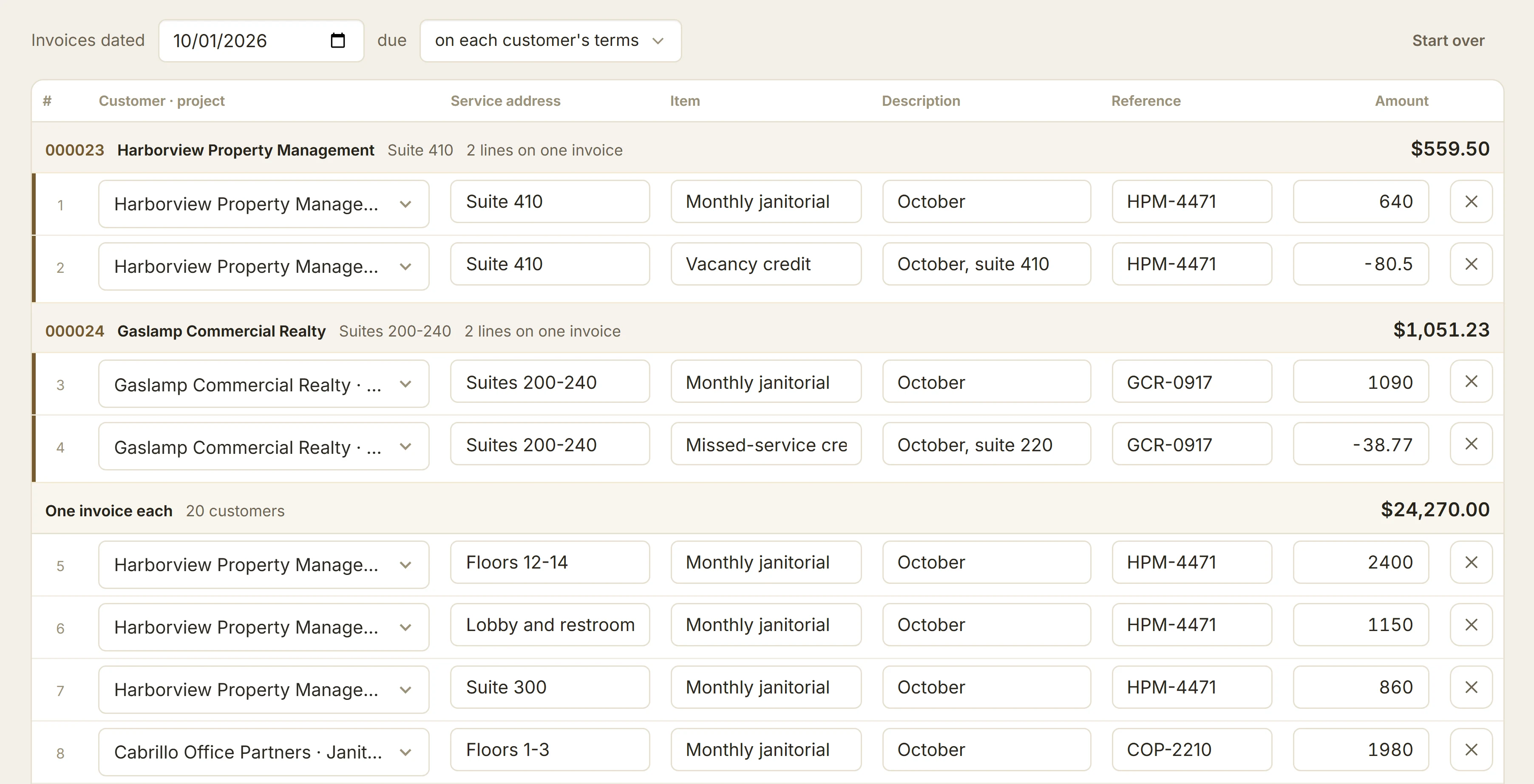
Repeat last month, change what changed, and create one invoice per customer or per site.

Jobber
Batch create makes one draft per client, from jobs set to remind you to invoice.
How batch invoicing works
Invoice several: last month repeated, a row per suite with its service address, reference and amount

Checks

The morning’s mail, recorded.

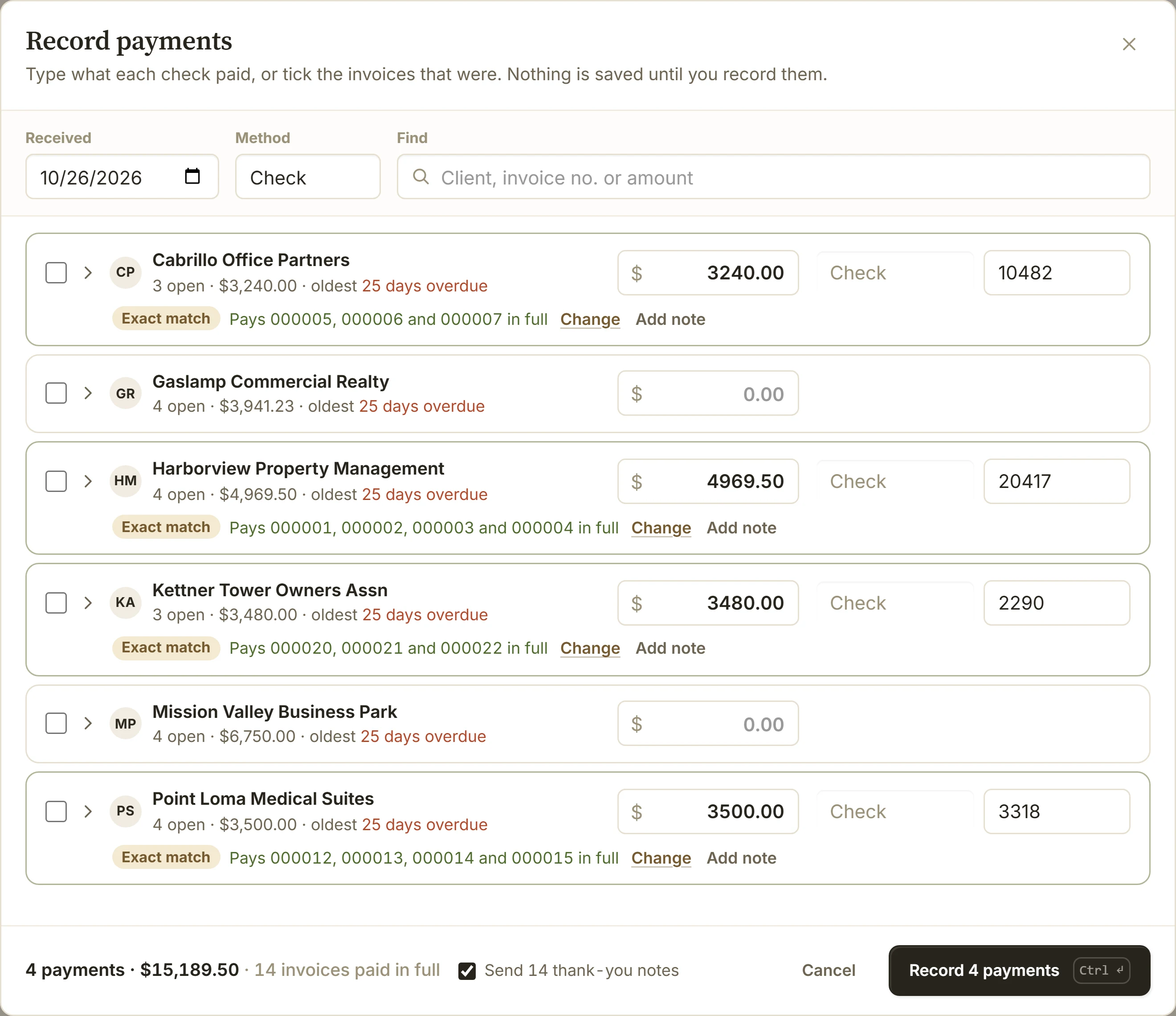
Type each customer’s check against their open invoices, then record them all at once, with one Undo.

Jobber
A payment is recorded from one client’s profile; it can cover several of that client’s invoices.
How recording payments works
Record payments: four checks typed against four property managers, each paying their invoices in full

Reminders

Follow-up that runs on your schedule.

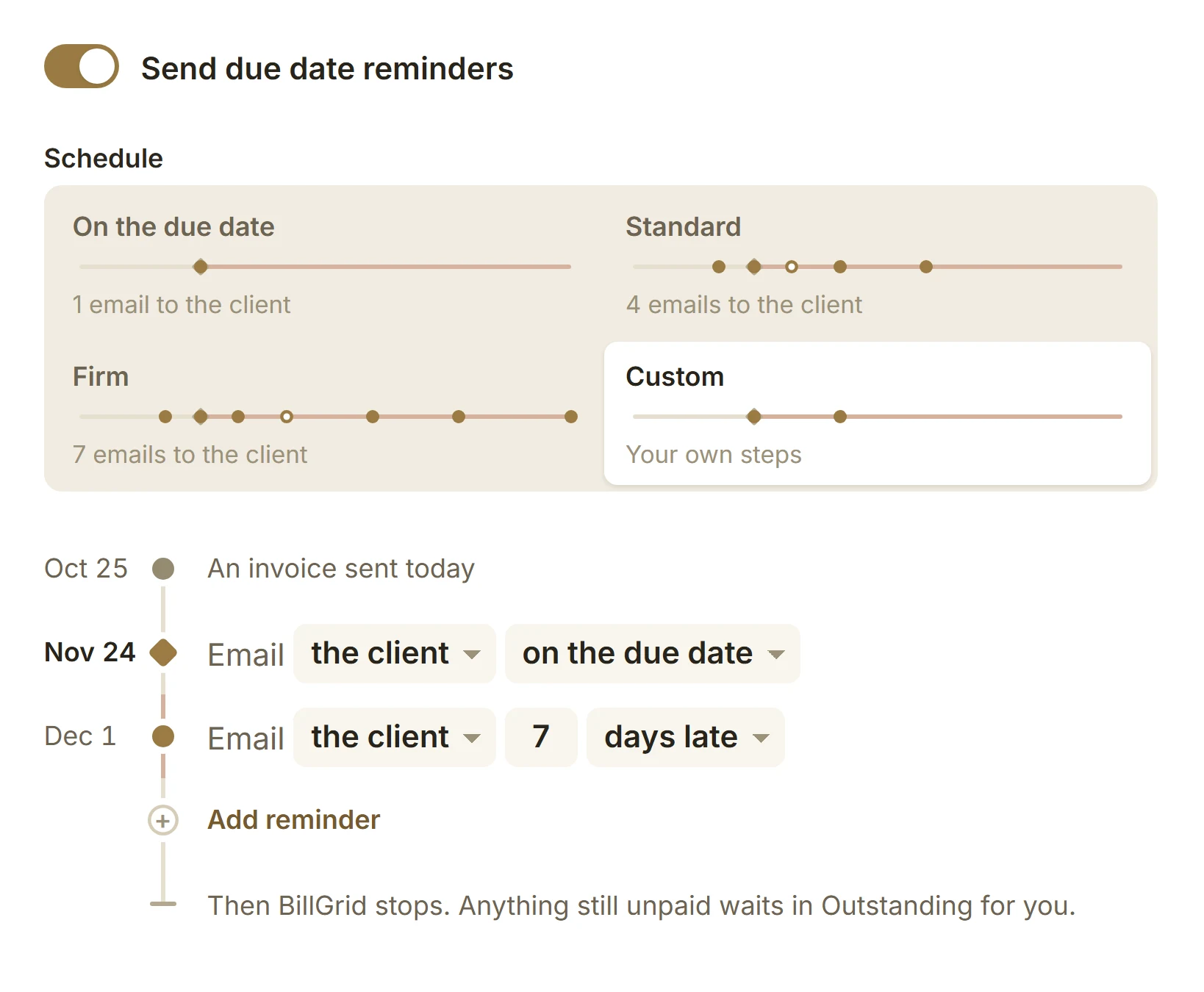
Pick a ready schedule or set your own steps before, on and after the due date. Pause one invoice when a client asks for time. Reminders stop the moment it’s paid.

Jobber
From Connect, $139: up to two follow-ups, both after the due date.
How reminders work
BillGrid’s reminder settings: ready schedules On the due date, Standard, Firm and Custom, and a custom timeline that emails the client on the due date and 7 days late, then stops

Late fees

Late fees that follow your terms.

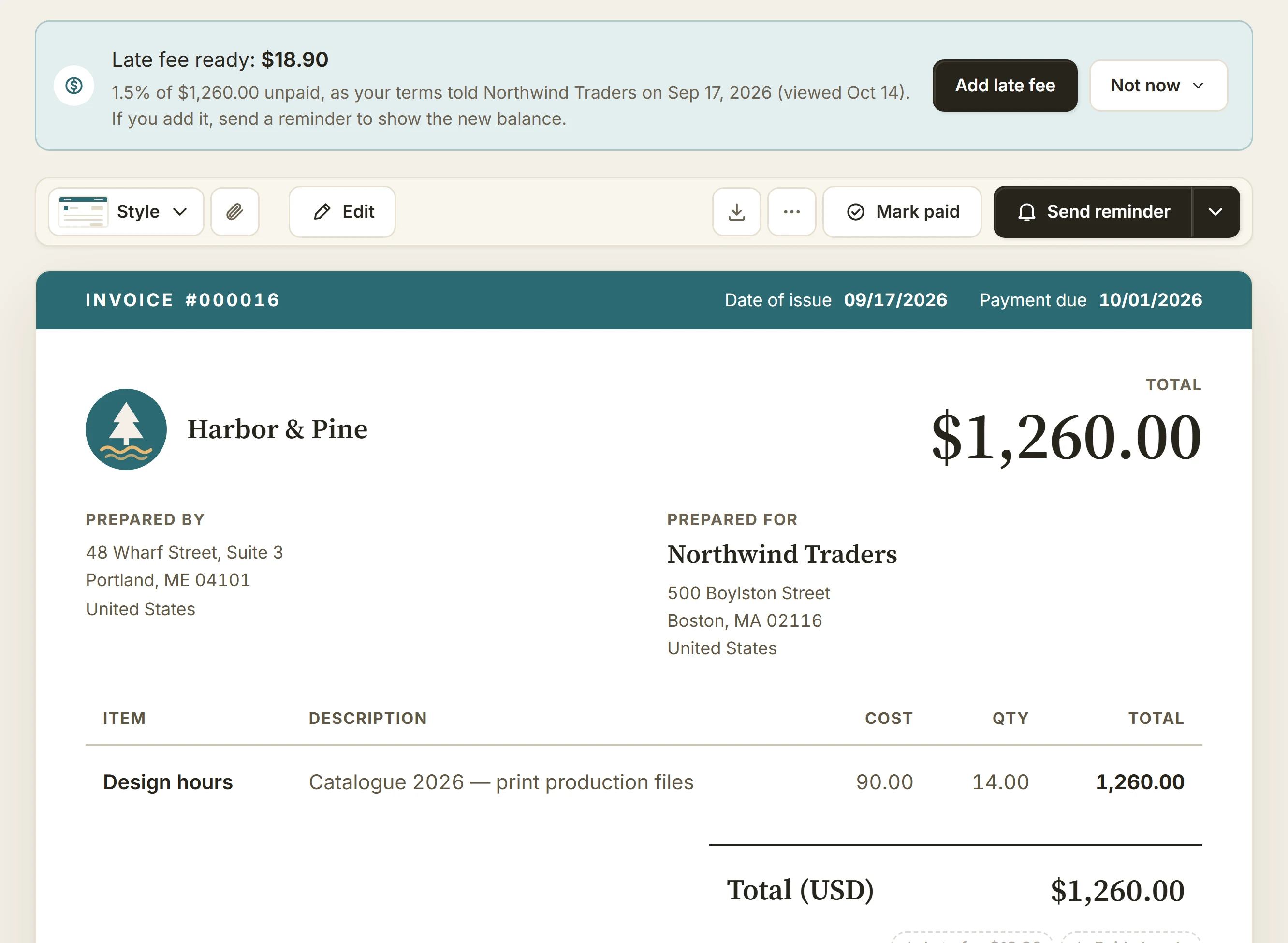
A percentage, a flat fee or both, once or repeating, with a cap if you want one. Add each fee yourself when it’s ready, or let it apply on its own.

Jobber
No automatic late fees in its help center; you state the policy on the invoice.
How late fees work
An overdue BillGrid invoice with a banner: late fee ready, $18.90, 1.5% of $1,260.00 unpaid as the terms told the client, with Add late fee and Not now

Side by side

Every row, checked.

BillGrid against Jobber’s own pricing page and help center. Where Jobber needs a higher plan, the row says which.

  • Included
  • On a higher plan
  • Not offered
Feature BillGrid $10 a month (Solo), $20 (Pro), $40 (Team) Jobber Core $49, Connect from $139, Grow from $199 a month
Price and limits
Starting price $10 a month, or $8 billed yearly $49 a month on Core, $29 billed yearly; list prices, before new-customer offers
Clients and invoices Unlimited Unlimited, from Core
People $8 a month each on Pro and Team; Team includes four Core is one person; Connect and Grow are priced by team size, $29 a month per extra user
Free trial 30 days, no card 14 days, no card, with Grow’s features
Card payment fees Stripe’s 2.9% + 30¢; BillGrid adds nothing 2.9% + 30¢ through Jobber Payments; other processors on select plans
Bank (ACH) payment fees Stripe’s 0.8%, at most $5 1% through Jobber Payments; instant payouts 1% more
Billing
Batch invoicing Many customers in one sheet: repeat last month or paste rows, one invoice per customer or site One draft per client, from jobs set to remind you to invoice
Service addresses Saved per customer; each invoice names its site Several properties per client, each with its work history
Recording checks A stack of checks across customers, recorded at once One client at a time, across that client’s invoices
Automatic reminders Before, on and after the due date, on a ready schedule or your own Connect, $139 up to two, after the due date
Automatic late fees A percentage, a flat fee or both; once or repeating; optional cap None in its help center
Recurring invoices Weekly to yearly, every plan Recurring jobs remind you to invoice; automatic payments on Connect charge a saved card
Quotes and estimates Approved by typed name; deposit invoiced on approval Approved in its Client Hub, with a deposit paid on approval
The field and the books
Scheduling No; BillGrid syncs due dates with Google Calendar on Pro and Team Every plan
Route optimization No Connect, $139 and up
QuickBooks Online Pro, $20 supported invoices and payments (one US company, USD) Connect, $139 with Xero too
Apps No; BillGrid runs in the browser, phone included iPhone and Android

Switching

Moving over is three steps.

  1. Export your clients from Jobber

    Export your clients from Jobber (Clients, then More Actions, then Export Clients) as a CSV file; it arrives by email, with property addresses. Our guide shows where to find it.

  2. Import them into BillGrid

    BillGrid shows what it found in the file, and what it skips, before anything is saved.

  3. Connect Stripe and send

    Connect your own Stripe account, set your reminders, and send your next invoice.

Jobs, schedules and quotes stay in Jobber. Keep it for scheduling if your crews run from it.

Questions

Before you switch.

Does Jobber’s Core plan send payment reminders?

No. Invoice follow-ups start on Connect, $139 a month ($99 billed yearly), and send up to two reminders after the due date. BillGrid’s reminders come with every plan, before, on and after the due date.

Does Jobber have batch invoicing?

It makes one draft invoice per client from jobs set to remind you to invoice, and can send them together. BillGrid bills every customer in one sheet, from last month or a pasted route sheet.

What does Jobber charge per payment?

Through Jobber Payments, 2.9% + 30¢ for cards and 1% for US bank payments, plus 1% for instant payouts. BillGrid adds nothing to Stripe’s 2.9% + 30¢, or 0.8% (at most $5) for a US bank payment.

I schedule crews in Jobber. Can BillGrid do that?

No. BillGrid has no scheduling, routes or GPS. If your crews run from Jobber, keep it for that; BillGrid is for businesses whose work is the billing.

The whole route. One sitting.

Try any plan free for 30 days. Bring your Jobber clients over and send your next invoice today.

Start free for 30 days
  • No card to start
  • Cancel online, any time
  • 30 days’ notice before any price change

Jobber is a trademark of its owner. BillGrid is independent and isn’t affiliated with, endorsed or sponsored by it. Its facts come from its public pages on Oct 26, 2026: pricing, Core plan, follow-ups, batch create, properties, recording payments, payment integrations, route optimization and export; Stripe’s from Stripe pricing. Prices are US list prices billed monthly, before any introductory offer. Spotted something out of date? Tell us.

Full-size screenshot