No shared timer to take turns with.
A designer and a strategist can each run a timer while working on the same client. Each BillGrid timer belongs to the person using it; one teammate starting work does not stop another.
Compare BillGrid vs 17hats
BillGrid Team includes three people for $25 a month, each with their own timer and client access. 17hats supports time billing but limits the account to one running timer. Bring the team’s recorded work through review, payment and final-file handover.
No card neededFree for three active clients and three documents a monthPro from $10/month


Why choose BillGrid over 17hats?
For studios and consultancies, booking is the beginning. Keep each person’s time, the bill and the final handover connected as the work gets done.
A designer and a strategist can each run a timer while working on the same client. Each BillGrid timer belongs to the person using it; one teammate starting work does not stop another.
On Pro and Team, share working proofs immediately and hold chosen final files until the invoice is paid in full. BillGrid releases them and emails the client when they are ready.
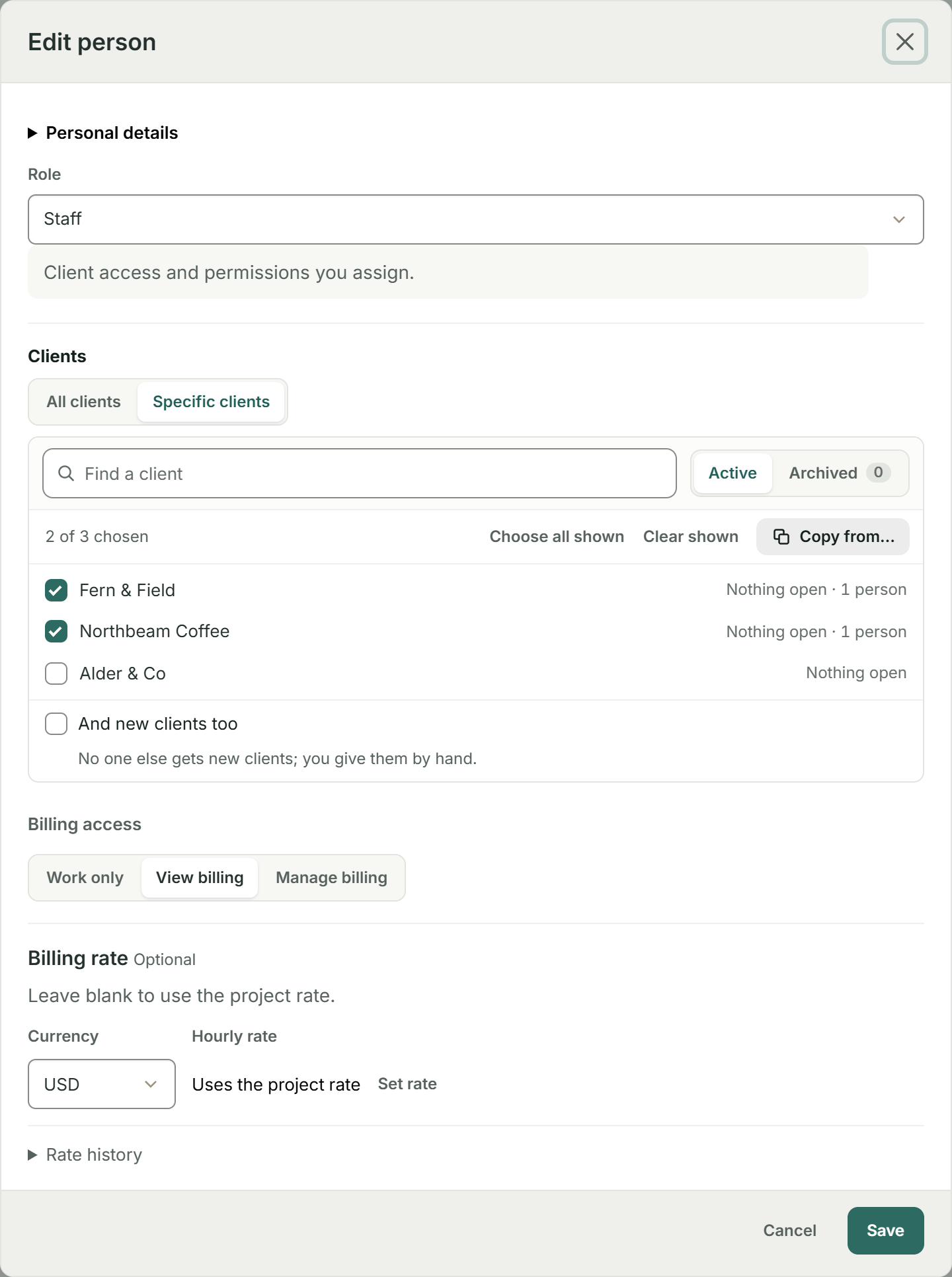
On Team, give someone access to selected clients, with Work only, View billing or Manage billing. A project lead can check the figures without authority to send bills or record payments.
The price, in perspective
Compare one person’s subscription below. BillGrid Team pricing is shown separately; the calculator does not assume how many people the current 17hats offer includes.
BillGrid is free for three active clients and three documents a month, with unlimited projects on every plan. Pro, with unlimited clients and invoices, is $10 a month.
Explore BillGrid plansUS list prices, billed monthly. Introductory offers excluded.
Prices checked .
One person. The current 17hats offer is modeled here, not a legacy subscription.
Count the invoices, estimates and contracts you issue. They share BillGrid Free’s monthly document allowance. Payment-unlocked files are on Pro and Team.
For solo work, BillGrid Pro is $10 a month; the current 17hats all-inclusive offer is $60/month. Team includes three people for $25, but 17hats team pricing is not modeled.
After the booking
Real BillGrid screens and a real billing recording, using illustrative client work.
Team work to one invoice
When two people work at once, each can keep their own BillGrid timer running. Their recorded work retains its saved billing rate, ready for review together before you create the invoice draft.
In this 16-second recording, four people’s completed work becomes a $1,335 draft. Review the entries and rates first, then create the bill.
Four people in BillGrid cost $30 on Team a month. Team includes three people; each additional person adds $5 a month.
Explore time and billingDelivery on Pro and Team
Share Working_proofs.pdf while the client reviews the job. Keep Final_brand_files.zip visible but locked until the invoice is paid in full. On Pro and Team, BillGrid handles the release and ready email without a separate file-sharing link to update.

Team access on Team
Choose the clients this teammate can reach, then choose Work only, View billing or Manage billing. Here, two clients are selected with View billing. Their billing level applies across their chosen clients; they do not need account-wide Admin access to review the figures.

Give the whole team room to work.Independent timers, reviewed billing and final-file handover. Team access is on Team; payment-unlocked files are on Pro and Team.
Start your next projectChoose around your actual work
Choose BillGrid for independent timers, saved-rate billing review and access to selected clients. You can start a project without changing the agreements or historical invoices already held in 17hats.
Keep proofs and selected final downloads on the invoice itself. A partial payment does not release files marked for after payment; the invoice must be paid in full. Available on Pro and Team.
17hats combines scheduling, questionnaires and multi-step workflows with quotes, contracts and invoicing. BillGrid has no appointment scheduler or general workflow builder. Include any tools you would retain in the cost of switching.
Side by side
Both products support quotes, contracts, time billing and staged payments. The differences below concern team timing, client access and delivery.
| Feature | BillGrid Free, $10 a month (Pro), $25 (Team) | 17hats Current all-inclusive offer: $60/month; annual and two-year terms available |
|---|---|---|
| Team work and delivery | ||
| Simultaneous team timers | One active timer per person; teammates can time work at the same time | One active timer for the account, including with multiple users; manual entries supported |
| Time-to-invoice | Review recorded work and saved rates before creating the invoice draft | Hourly rates, rounding choices, time logs and invoice creation |
| Teammate client access | Team All or selected clients; Work only, View billing or Manage billing | Owner, Admin and Team Member; Contacts/Projects permission exposes all basic contact and project details |
| Final files released after payment | Pro, $10 and up: chosen invoice attachments unlock after full payment, with a ready email | Portal file sharing uses links to external hosting; project uploads are not shown in the portal |
| Contact client portal | Pro, $10 and up: shared work, documents, files and conversations, with individual contact scopes | Sent quotes, contracts, questionnaires, invoices and event details; contact and project visibility controls |
| Scope, billing and payment | ||
| Packages and optional extras | Choose a package and extras on the estimate, then carry approved scope into billing | Standard, choose-one and choose-any quote items; optional bundled contract and invoice |
| Contracts with e-signature | Standalone or with an estimate; email verification and linked change orders | Signed contracts, including a quote-to-contract-to-invoice flow |
| Staged payments on one invoice | 2 to 12 named, dated parts; amounts or percentages, with the balance together | Custom or equal installments with amounts or percentages and due-date rules |
| Recurring invoices | Weekly to yearly; review-first on Free, automatic sending on Pro and Team; optional client-authorized saved-card autopay on Pro and Team for eligible invoices | Recurring invoices and automatic billing with a supported payment setup |
| Automatic reminders | Pro, $10 and up: ready schedules or custom steps before and after the due date; pause one invoice | Document reminders and workflow follow-ups |
| Automatic late fees | Pro, $10 and up: a percentage, a flat fee or both; once or repeating; optional cap | Invoice and document reminders; confirm any late-fee handling with 17hats |
| Online payments | Cards, available Apple Pay or Google Pay, or eligible USD bank payments through your own Stripe account | Card and ACH payments through its supported payment setup; processing fees apply to both |
| Appointment booking and questionnaires | Keep a separate scheduler or questionnaire tool for those needs | Online scheduling, questionnaires and multi-step booking workflows |
| Bank-feed bookkeeping | Client work, expenses, invoices and payments; retain a bookkeeping tool as needed | Cash-basis bookkeeping and reports; Bank Connect costs $5/month more |
| Working on your phone | Use the workspace in your phone browser, with no app to install. BillGrid has no native mobile app | Responsive web workspace and native iOS and Android apps with push notifications |
| Subscription scope | ||
| Solo starting price | Free for three active clients and three documents a month; Pro $10 a month, or $8 a month billed yearly | $60 monthly, $600 yearly or $800 for two years; regular current offer, not introductory or legacy rates |
| People and team pricing | Team includes three people for $25; $5 per additional person a month | Additional users can be purchased; confirm included capacity and your renewal before comparing a team |
Switching
In 17hats Contacts or Leads, open the gear menu and choose Export Contacts. Filter by type or tag if helpful. Prepare BillGrid’s client and contact CSV columns, then review the recognized records before saving. Our guide shows how to prepare and review your CSV.
BillGrid shows what it found in the file, and what it skips, before anything is saved.
Check the client, work and balance. Connect Stripe if you want online payments, then send when you are ready.
The 17hats export contains contact details only. Save project details, signed documents, invoices, emails and time logs separately. BillGrid client import does not transfer those records, paid balances, saved cards or booking workflows; start with the next project and retain the originals.
Free supports three active clients. If your reviewed import would go over that allowance, choose Pro or Team before importing.
Questions
Yes. Current plans include time tracking, rates, rounding and time-to-invoice. The older Essentials and Standard plans may charge a separate time-tracking add-on. The team difference is the running timer: 17hats allows one for the account; BillGrid allows one per person, so teammates can time their work concurrently.
This calculator compares solo subscriptions only. 17hats says additional users can be purchased, but its current offer does not clearly state the included capacity and extra-user price. Confirm those terms for your account. BillGrid Team includes three people for $25 a month, with $5 per additional person.
Yes. Its portal supports sent quotes, contracts, questionnaires and invoices, with contact and project visibility controls. It also supports scheduled installments on an invoice. BillGrid’s delivery advantage here is native invoice files: share proofs now and release chosen final downloads after full payment on Pro and Team. 17hats documents externally hosted links for portal file sharing.
BillGrid supports estimates, package choices, contracts and invoices, but it has no appointment scheduler, general questionnaire builder or multi-step booking workflow builder. If your business relies on those 17hats tools, decide what you would keep before moving. Any retained subscription belongs in your total cost.
No. This move imports reviewed client and contact records, not the project history, signatures, invoices or payment authorizations. Download original records before closing access to 17hats. Begin the next project in BillGrid and reconcile any work or balances you recreate before sending a bill.
Yes. Free is for one person and one business: three active clients and three documents a month (invoices, estimates and contracts together), unlimited projects, time and expenses, and card and bank payments. Reminders, late fees, automatic recurring invoices, files and integrations are on Pro, from $10 a month.
Yes. On Pro and Team, enable automatic payments and the required advance reminder. Your client confirms their identity and opts in when saving a card. Eligible invoices sent at least three days ahead charge on their due date. The client can skip an invoice or stop automatic payments. Payment schedules and saved-bank autopay are not included. See eligibility and controls.
Independent timers, reviewed billing and final-file handover. Team access is on Team; payment-unlocked files are on Pro and Team.
Free for three active clients and three documents a month. Pro and Team add unlimited clients and invoices.
Start your next project17hats alternative Reviewed