The retainer balance is already there.
On Pro and Team, see included hours, capped carry-over and the extra hours waiting for your decision. Your monthly invoice starts with the agreement you made.
Compare BillGrid vs Dubsado
Keep the monthly fee, included hours and extra work together. BillGrid turns the service you deliver into a reviewed invoice, with a clear hours balance for every ongoing client.
No card neededFree for three active clients and three documents a monthPro from $10/month

The BillGrid advantage
On Pro and Team, see included hours, capped carry-over and the extra hours waiting for your decision. Your monthly invoice starts with the agreement you made.
Log time against the project, keep its saved rate and review the invoice draft. Project work and billing stay connected.
Team includes three people for $25 a month, then $5 for each person more.
What you would use every day
For a designer, consultant or studio with ongoing clients, the next useful answer is how much work is included, what is left and what to invoice.
Retainers on Pro and Team
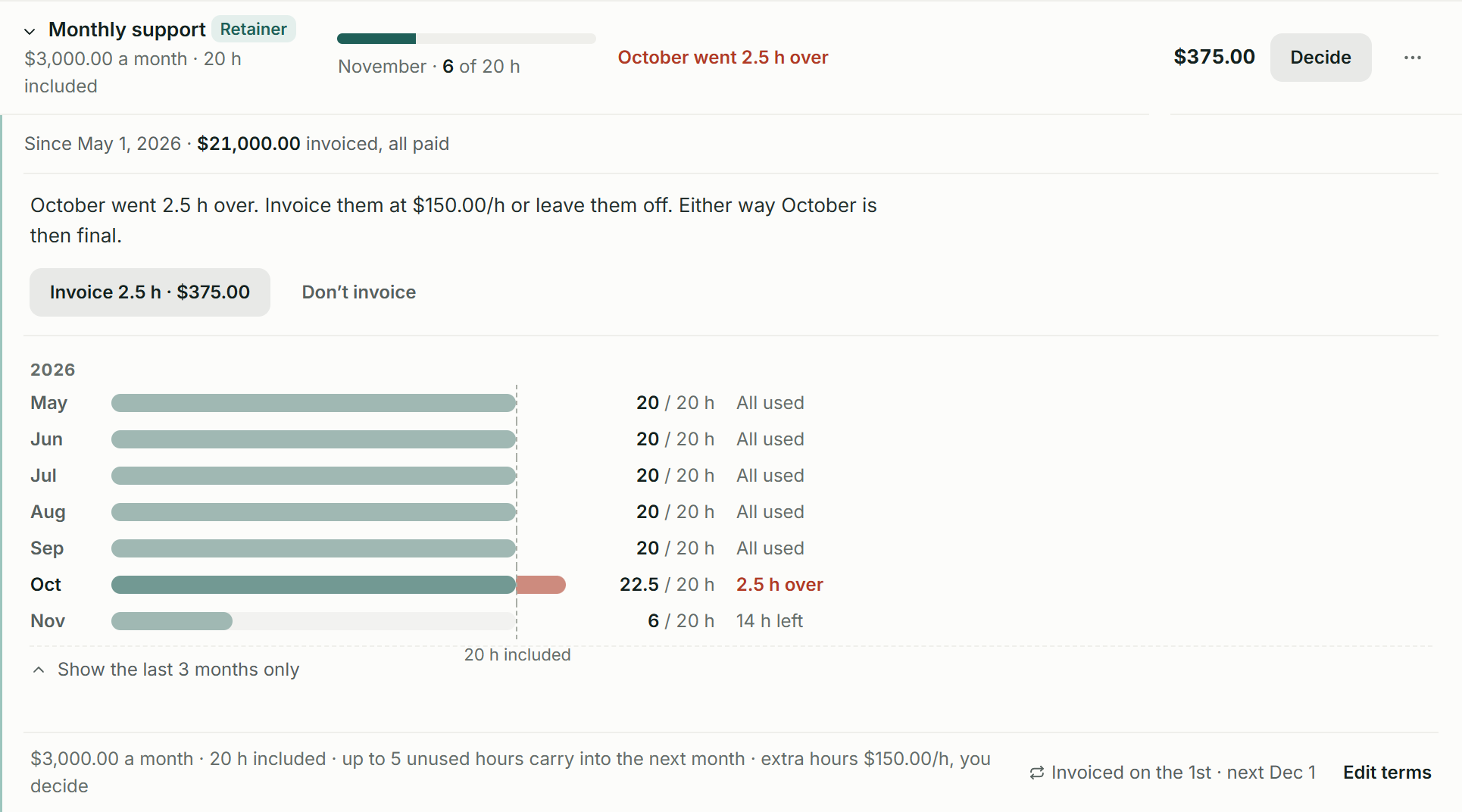
Here, $3,000 a month includes 20 hours. November has 14 hours left; October used 2.5 extra hours, leaving a $375 decision. On Pro and Team, carry unused hours within your cap and choose whether to invoice the extra work.

From work to invoice
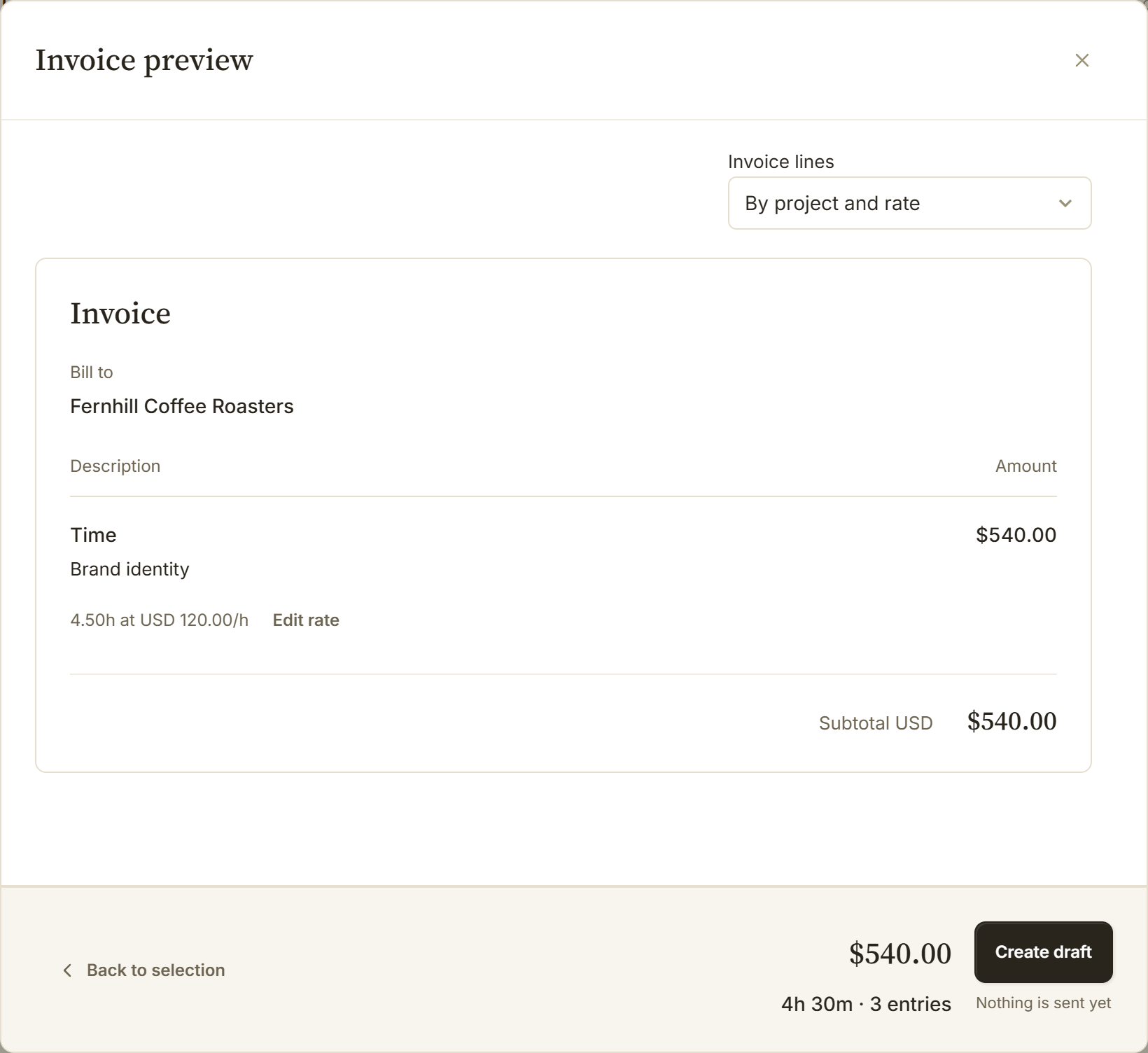
For hourly work outside a retainer, 4.5 hours of brand identity work at $120 become $540 before tax here. Choose the work and grouping, check the saved rate, then create the draft. Keep the supporting detail so the client can follow the bill.

Delivery on Pro and Team
On Pro and Team, share Working_proofs.pdf during the project and hold Final_brand_files.zip on its invoice until payment in full. The client sees what is waiting; BillGrid emails them when the final files are ready.

Put it to work on your next invoice.Start with one client and a real piece of work.
Start for freeThe price, in perspective
Choose the features and volume you need. See the relevant plans side by side.
BillGrid is free for three active clients and three documents a month, with unlimited projects on every plan. Pro, with unlimited clients and invoices, is $10 a month.
Explore BillGrid plansUS list prices, billed monthly. Introductory offers excluded.
Prices checked .
BillGrid Free assumes no additional estimates or contracts are issued that month; those also share its monthly document allowance.
The retainer choice compares plans with ongoing retainer billing. Dubsado includes recurring fee invoices; BillGrid’s paid workflow adds settled-period history, capped carry-over and extra-hours decisions. Compare those controls above.
BillGrid Pro is $10 a month for one person. Dubsado Starter is $35/month and Premier, which includes time tracking, is $55/month; both include the owner plus three users.
Choose for the work you do
Send an estimate with packages and optional extras, attach your service agreement, and bring the approved scope into a project when you are ready.
A recurring fee alone does not tell you how many hours remain. BillGrid’s retainer shows that balance and leaves the decision on extras with you.
Move one ongoing client first. Set the fee, included hours and starting date, then check the first invoice before sending it.
At monthly list prices, one person using time tracking pays $10 on BillGrid Pro, compared with $55 on Dubsado Premier. Four people are $30 on Team on BillGrid; Dubsado Premier still includes the owner plus three users for $55. These are subscription examples; Dubsado’s scheduler and Flows are part of its wider scope.
Put one retainer through its next month.See the work, the allowance and the invoice together.
Start for freeSide by side
Dubsado’s current Starter and Premier plans are shown here. Existing subscribers may have different pricing.
| Feature | BillGrid Free, $10 a month (Pro), $25 (Team) | Dubsado Starter $35/month; Premier $55/month |
|---|---|---|
| Doing and billing the work | ||
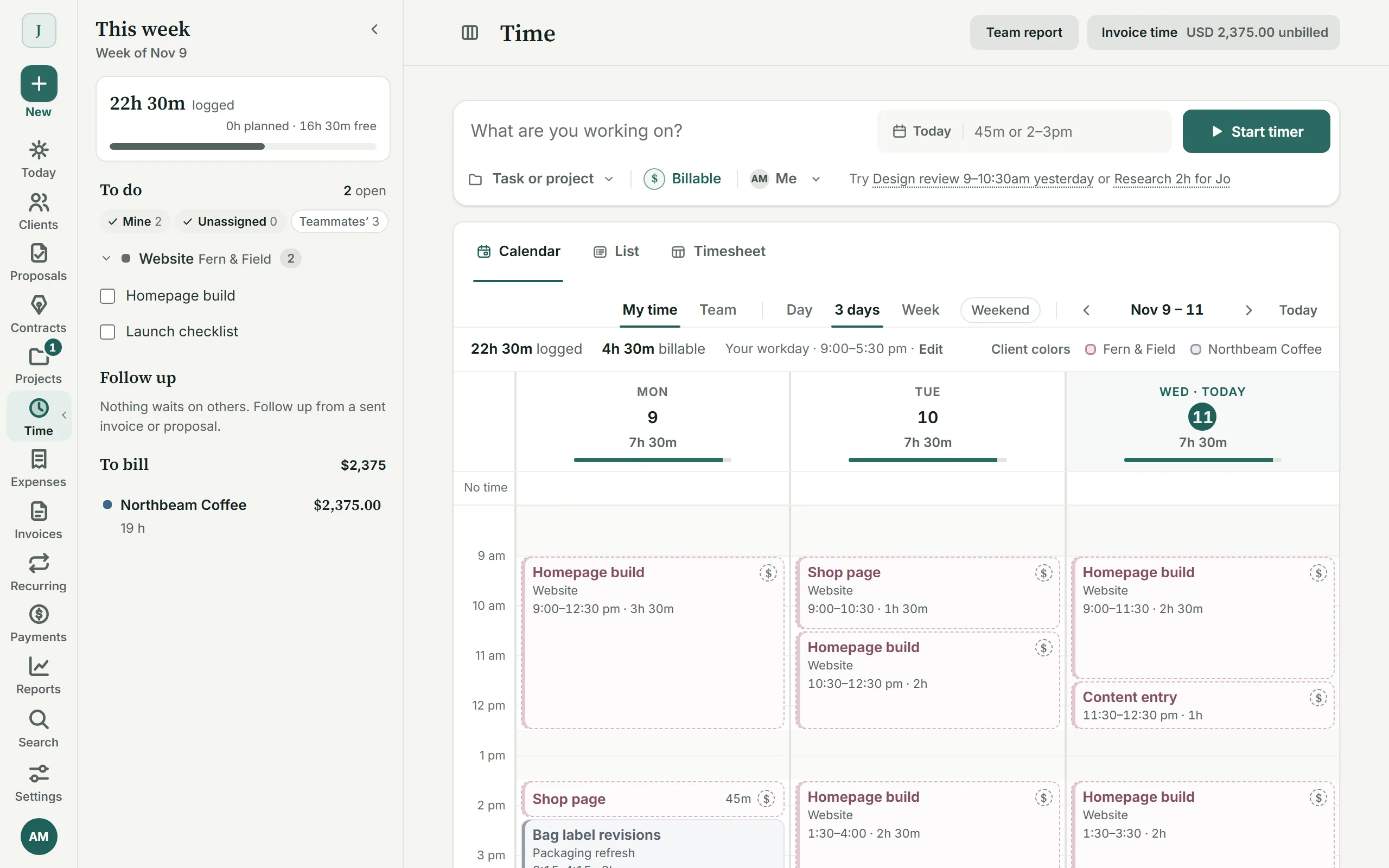
| Project time tracking | Timer, typed line, calendar or weekly timesheet; invoice at saved rates | Premier, $55 Log hours and apply time entries to invoices |
| Included-hours retainers | Pro, $10 and up: a fee, included hours, capped carry-over and a decision on extras | Recurring invoices can bill a retainer; remaining included hours are not calculated |
| Projects and tasks | A project board, tasks, milestones, hours and expenses with their billing | Projects, tasks and task boards on Starter and Premier |
| Estimates and proposals | Packages, optional extras and approval; a scheduled deposit creates its invoice | Packages and form templates; public proposals on Premier |
| Contracts with e-signature | Standalone agreements or attached to estimates, with email-verified signatures | Contracts and countersigning; included in Starter and Premier |
| Client portal | Pro, $10 and up: project progress, approvals, invoices, files and conversations | Client portals on both plans |
| Recurring invoices | Pro, $10 and up: weekly to yearly; optional client-authorized saved-card autopay on eligible invoices | Recurring invoices and autopay on both plans |
| Automatic reminders | Pro, $10 and up: before, on and after the due date; ready schedules or your own; pause one invoice | Payment-plan reminders on Starter and Premier |
| Automatic late fees | Pro, $10 and up: a percentage, a flat fee or both; once or repeating; optional cap | Automatic invoice late fees are not established by the current pricing and plan help reviewed |
| Specialist tools and access | ||
| Appointment booking | Use your booking tool alongside BillGrid | Premier, $55 Built-in scheduler and video conferencing |
| Configurable workflow builder | Project stages and billing automations; no general client-process builder | Premier, $55 Flows automate the client process |
| Working on your phone | Use the workspace in your phone browser, with no app to install. BillGrid has no native mobile app | Mobile website and iOS/Android companion apps; confirm app support for your Dubsado account version |
| QuickBooks Online | Pro, $10 and up: supported invoices and gross payments; one US company in USD | Premier, $55 QuickBooks and Xero bookkeeping integrations |
| Price and limits | ||
| Starting price | Free for three active clients and three documents a month; Pro $10 a month, or $8 a month billed yearly | $35/month Starter or $55/month Premier; $335/$525 with annual billing |
| Clients and projects | Unlimited projects on every plan; three active clients on Free, unlimited on Pro and Team | Unlimited clients and projects on both paid plans |
| People included | Team includes three people; $5 a month for each person more | The owner and three additional users; larger teams use additional-user bands |
| Payment providers | Cards, available Apple Pay or Google Pay, or eligible USD bank payments through your own Stripe account | Dubsado Payments, powered by Stripe; Square and PayPal are also supported |
Switching
In Dubsado Contacts, use Export CSV and include the client names, company, email, phone and billing address. Prepare the file using BillGrid’s example headers. Our guide shows how to prepare and review your CSV.
BillGrid shows what it found in the file, and what it skips, before anything is saved.
Check the client, work and balance. Connect Stripe if you want online payments, then send when you are ready.
This moves the reviewed client list, not Dubsado projects, forms, flows, signed contracts, invoice history or retainer balances. Keep those records in Dubsado and set up the next period in BillGrid.
Free supports three active clients. If your reviewed import would go over that allowance, choose Pro or Team before importing.
Questions
Its current time-tracking guide says it does not calculate remaining hours against a retainer. Dubsado suggests a recurring invoice for the fee and project notes for the hours. BillGrid Pro and Team keep the included-hours balance, carry-over cap and decision on extra hours together.
Yes, on Premier. You can log time and apply it to an invoice. BillGrid includes project time tracking on every plan, so you can record the work and review an invoice without a separate time-tracking upgrade.
Start at the next monthly or quarterly boundary. Reconcile any unused hours and unpaid Dubsado invoices, then agree the first BillGrid period, its included hours and carry-over terms with the client. The client CSV does not transfer retainer balances or autopay instructions. Keep copies of the old agreement and invoices, and review the first BillGrid draft before sending.
Yes. Keep the booking system that works for you. BillGrid handles the project, agreement, hours and billing; it has no appointment-booking scheduler or replacement for Dubsado Flows.
No. The client CSV does not import signed contracts or their signing records. Keep the originals available and create new agreements for future work.
Send an NDA or service agreement on its own, or attach a contract to your estimate so the scope and terms are approved together. Start from a template or use your own clauses. Your client verifies their email and types their name to sign; an authorized representative signs for your business. Keep the agreement and signing record with the client. On an unpaid account, first email that client an invoice or estimate. See the signing workflow and records.
Yes. On Pro and Team, enable automatic payments and the required advance reminder. Your client confirms their identity and opts in when saving a card. Eligible invoices sent at least three days ahead charge on their due date. The client can skip an invoice or stop automatic payments. Payment schedules and saved-bank autopay are not included. See eligibility and controls.
Start with your next invoice. Add a client, bring in the work and see how BillGrid fits.
Free for three active clients and three documents a month. Pro and Team add unlimited clients and invoices.
Start for freeDubsado is a trademark of its owner. BillGrid is independent and isn’t affiliated with, endorsed or sponsored by it. Its facts come from its public pages on Nov 12, 2026: pricing, current plan prices and product scope, Starter and Premier, time tracking and retainer hours, contact exports and mobile apps ; Stripe’s from Stripe pricing. Prices are US list prices billed monthly, before any introductory offer. Payment examples use standard US domestic card and ACH rates. International cards, currency conversion, bank verification and other processor charges can cost more; your Stripe agreement applies. Spotted something out of date? Tell us.