Give clients shared work, agreements and invoices in one private place. BillGrid Pro includes the portal for $10 a month; Moxie’s white-label portal starts on Pro at $25/month. Compare the tools included with each.
No card needed·Free for three active clients and three documents a month·Pro from $10/month
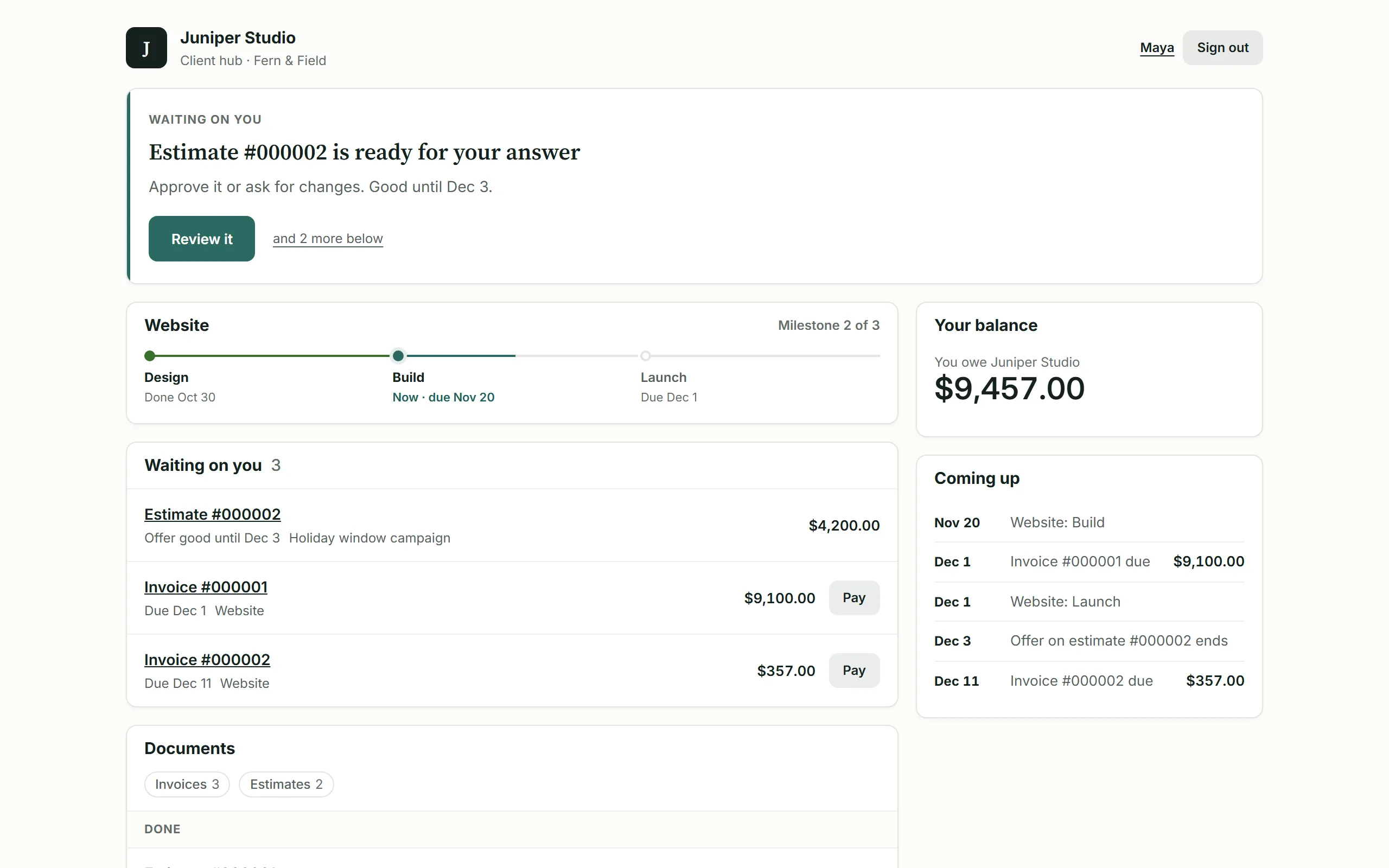
Pro and Team: the client’s project, documents and invoices. Real screen; illustrative data.View full size
Why choose BillGrid over Moxie?
Clear client work. Deliberate billing choices.
Keep the agreed work, who can act on the bill and what the client owes easy to follow.
Give each contact the right view.
On Pro and Team, choose invoices and payments, selected projects or all shared work for each client contact. The accounts team and project lead can have different views. Documents emailed to a contact remain visible to that recipient.
Reviewing is not sending.
On Team, View billing lets a teammate check the figures for clients they can reach. Sending invoices and recording payments remain with people who have Manage billing access.
One invoice. Every dated payment.
Split the project total into 2 to 12 named parts. Keep the amount due now, later dates and remaining balance on one invoice; let the client pay now or pay ahead.
The price, in perspective
Compare your monthly cost.
Choose the features and volume you need. See the relevant plans side by side.
BillGrid is free for three active clients and three documents a month, with unlimited projects on every plan. Pro, with unlimited clients and invoices, is $10 a month.
US list prices, billed monthly. Introductory offers excluded. Prices checked .
What you’d pay each month
List prices
Count invoices, estimates and contracts you issue. They share BillGrid Free’s monthly allowance.
You also need
Client portal without vendor branding starts selected: both requirements are paired. Turn it off to compare Moxie Starter. Moxie Pro also includes custom-domain, ticketing and phone features beyond this portal comparison.
BillGrid /mo
Moxie /mo
A client portal without vendor branding is included with BillGrid Pro at $10 a month; Moxie Pro costs $25/month. Moxie Starter is $12/month without the portal.
Real BillGrid controls with illustrative client work. See the access, payment and allowance decisions before you move.
Client portal on Pro and Team
The payer and project lead need different things.
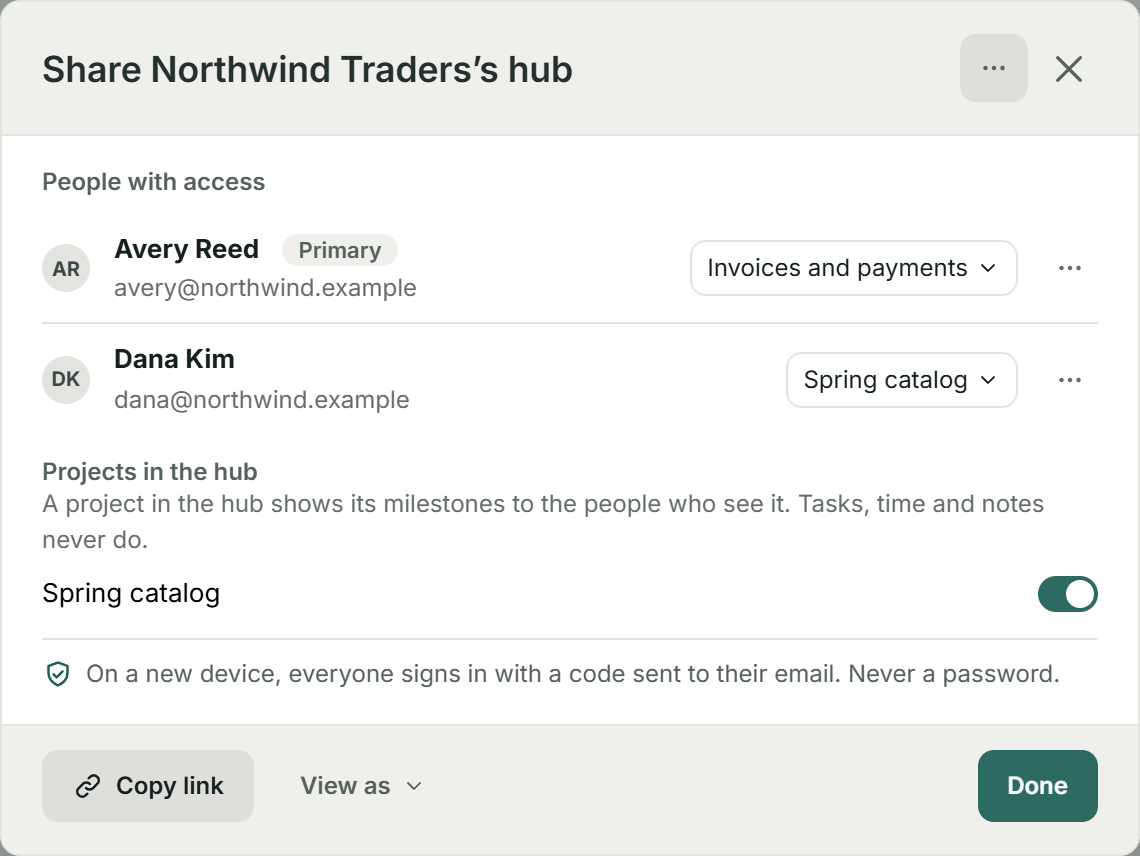
At Northwind Traders, Avery sees invoices and payments. Dana sees the Spring catalog project. Choose the scope for each contact, with documents emailed to them still available to that recipient.
Your client signs in with an email code or passkey. Internal tasks, recorded time and private notes stay inside your business.
Moxie
Pro includes a white-label portal, custom domain, client requests and ticketing. Its portal combines contact sign-in, client features and record visibility. BillGrid offers the individual contact choices shown here at its Pro price; it does not include Moxie’s custom-domain page builder.
Northwind Traders: invoices and payments for Avery; Spring catalog for DanaView full size
Team access on Team
Check the figures without authority to send.
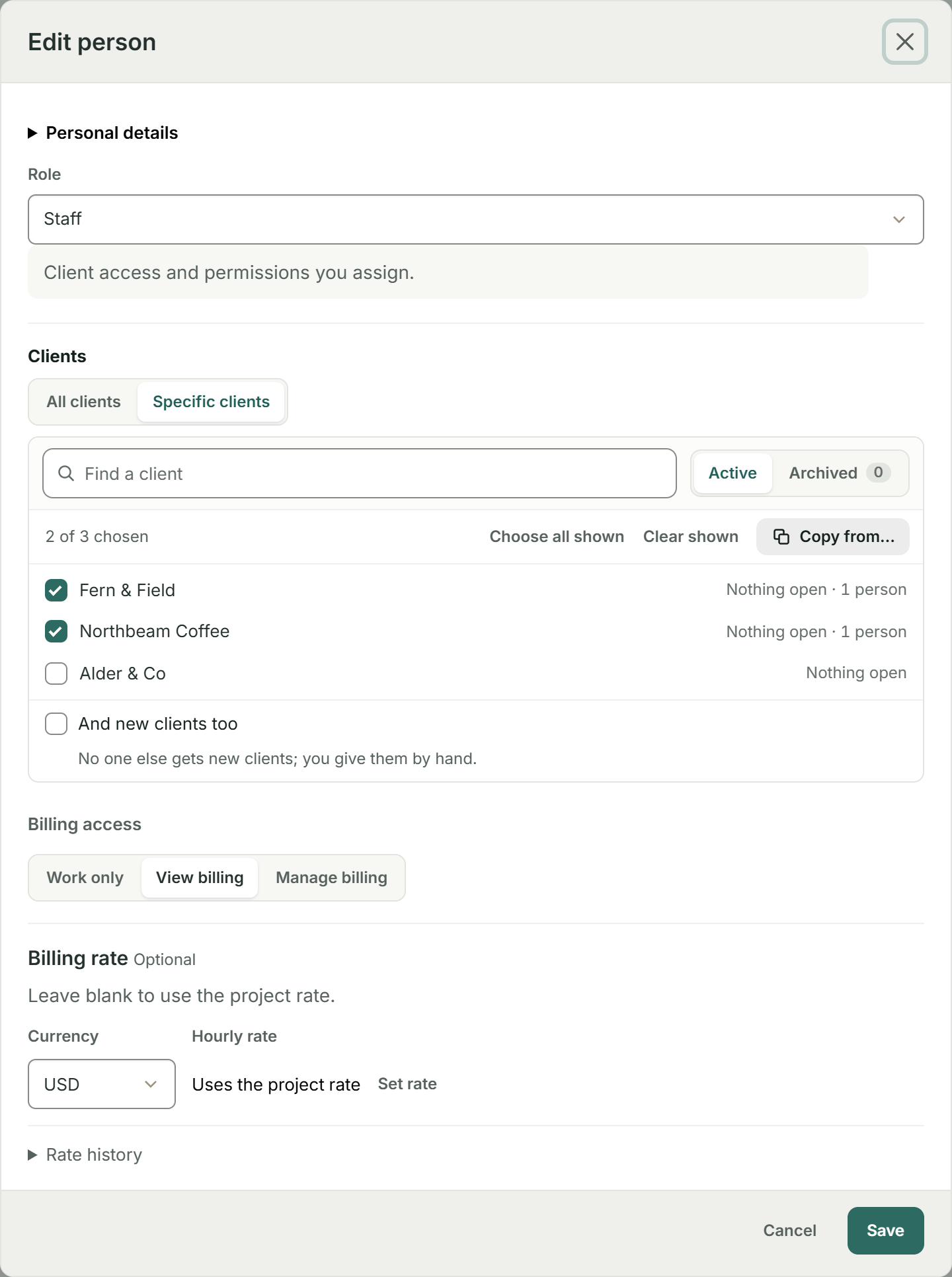
Jo Lin can reach Fern & Field and Northbeam Coffee, with View billing selected. On Team, that lets Jo review their figures without sending invoices, changing billing rates or recording a payment. The chosen billing level applies across the clients Jo can reach.
Moxie
Moxie Teams supports feature-restricted and client-restricted members. Its documented Invoices permission includes history, creation, sending and billing information; project collaborators cannot access client financials. Compare that with BillGrid’s separate View billing level.
Two chosen clients and View billing; Manage billing remains unselectedView full size
Deposits and dated installments
Keep the full payment story on one invoice.
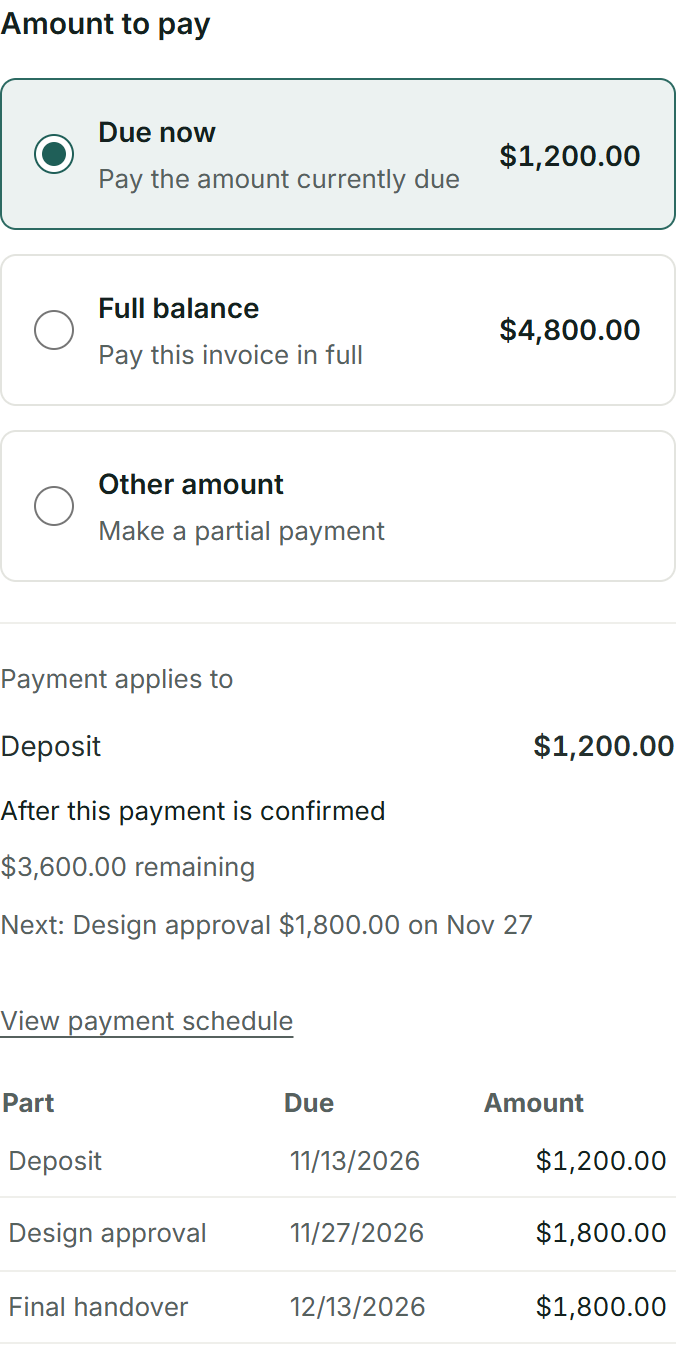
This $4,800 project has a $1,200 deposit and two $1,800 payments for design approval and final handover. After the deposit, $3,600 remains. Each part has its own date; the client can pay what is due, pay ahead or choose another amount.
Moxie
Moxie payment plans generate an ordered sequence of invoices, with dates or completion-based milestones and eligible automatic collection. BillGrid keeps 2 to 12 dated parts on one invoice; project completion does not trigger its charges.
The amount due now, the later stages and the remaining balanceView full size
Retainers on Pro and Team
Know what the monthly fee still covers.
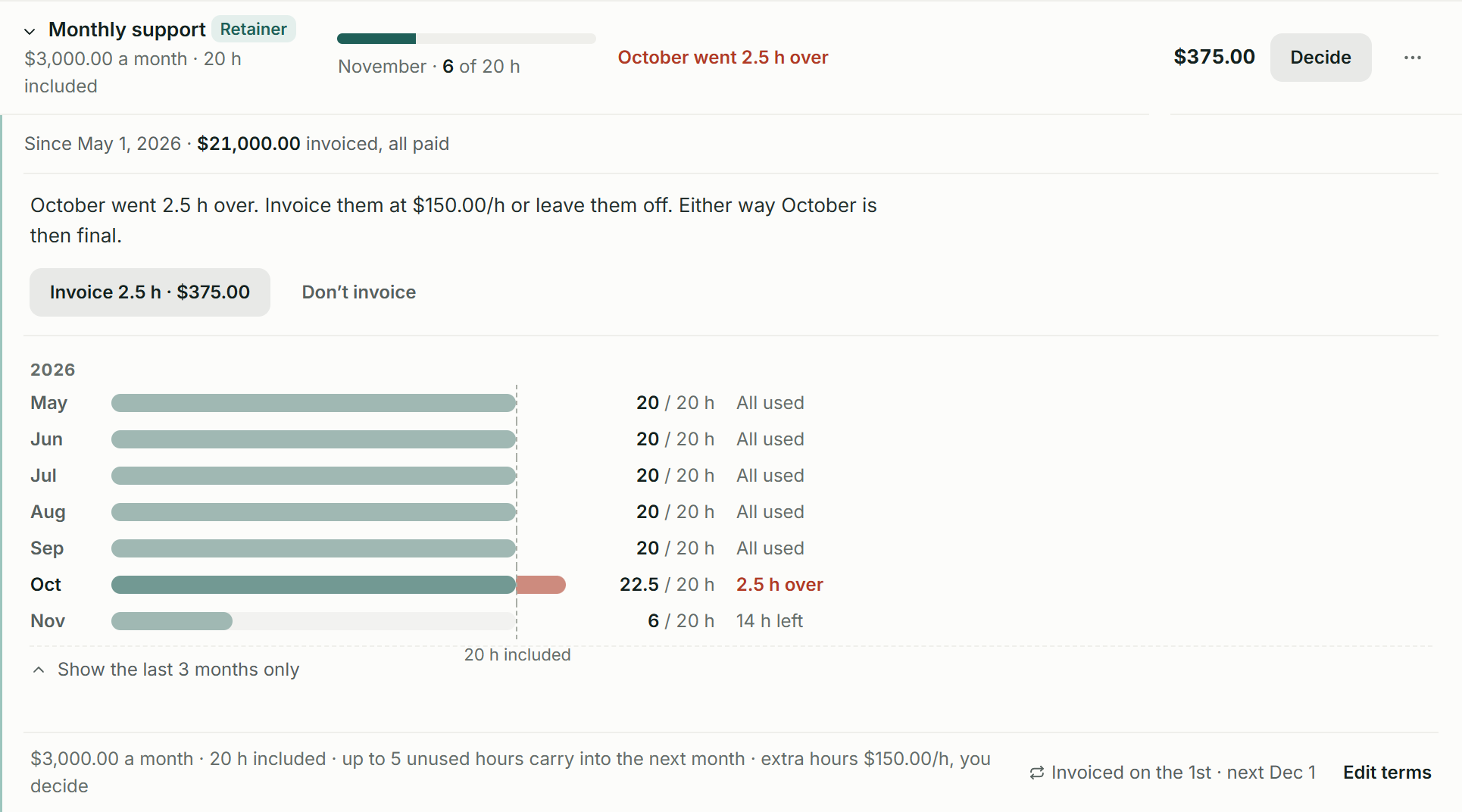
On Pro and Team, keep settled retainer periods, capped unused-hours carry-over and a choice on extra billing together. Here, $3,000 includes 20 hours; November has 14 left, and October’s extra 2.5 hours await a $375 decision.
Moxie
Moxie supports retainer-based project pricing and brings eligible retainer periods into invoices alongside time and costs. Compare its controls with the period history, carry-over terms and explicit extra-hours decision shown here.
Bring the next client into BillGrid.Add the client, agree the work and review the first invoice. Pro adds automated billing; Team adds staff billing-access controls.
Moxie Starter is $12/month and already includes projects, time, proposals, contracts and invoicing. BillGrid Pro is $10 a month with unlimited clients, projects and invoices. Compare the work you need, rather than assuming those basics require Moxie Pro.
A small team, without broad billing authority.
Three people are $25 on Team a month on BillGrid. Choose their clients and billing levels. Moxie’s project collaborators can work on assigned projects and track their time; full or restricted workspace members require Teams. Count the kind of access each person needs.
Keep the tools that earn their place.
Moxie offers appointment booking, capacity planning, a connected inbox, business phone features and visual workflows. Those may replace other subscriptions you use. BillGrid focuses on client work and billing; include the cost of any specialist tools you would keep.
Side by side
The detail behind the monthly price.
Moxie’s current Starter, Pro and Teams subscriptions; BillGrid’s current public plans.
Included
On a higher plan
Not offered
See details
Feature
BillGrid Free, $10 a month (Pro), $25 (Team)
Moxie Starter $12/month; Pro $25/month; Teams $40/month
Client work and billing
Client portal
Pro, $10 and up: shared projects, approvals, invoices, files and conversations; individual contact scopes
Pro and Teams White-label portal, custom domain, client requests and ticketing
Staff billing access
Team chosen clients and Work only, View billing or Manage billing; one billing level per teammate
Teams Restricted feature and client access; the Invoices feature includes creation and sending
Staged payments
2 to 12 named, dated parts on one invoice
Ordered invoices triggered by dates or milestones; eligible saved-method collection
Packages and agreements
Estimate packages and extras; standalone or attached agreement with email-verified signing
Agreement packages with offerings, add-ons, signing, payment choices and project creation
Project time and costs
Recorded hours at saved rates, milestones and billable expenses reviewed for an invoice
Project time, fixed-price charges, retainer periods, per-item deliverables and expenses
Included-hours retainer workflow
Pro, $10 and up: settled periods, capped carry-over and a choice to invoice extra hours or leave them off
Retainer-based project pricing and eligible period charges; compare the allowance controls you use
Recurring invoices
Weekly to yearly; review-first on Free, automatic sending on Pro and Team; optional client-authorized saved-card autopay on Pro and Team for eligible invoices
Recurring schedules with fresh billable content, draft or automatic delivery and eligible automatic payments
Automatic reminders
Pro, $10 and up: ready schedules or custom steps before and after the due date; pause one invoice
Invoice reminders configured with issue and due terms
Automatic late fees
Pro, $10 and up: a percentage, a flat fee or both; once or repeating; optional cap
One-time or monthly percentage late fees
Online payments
Cards, available Apple Pay or Google Pay, or eligible USD bank payments through your own Stripe account
Connected Stripe or PayPal; eligible Stripe cards, wallets and USD ACH
AI assistant
Pro, $10 and up: Claude or ChatGPT reads your account, drafts invoices, logs time and sends once you confirm
MCP reads and supported writes on active Pro and Teams; built-in Assistant access and add-on capacity are managed separately
Workspace and subscription
Appointment booking
Keep your booking tool; BillGrid focuses on project work and billing
Scheduling links, availability controls and eligible payments at booking
Visual workflow builder and business phone
Billing automations, without a general visual workflow builder or phone line
Pro and Teams Visual workflow automations and Communicator phone features; phone availability varies by country
Working on your phone
Use the workspace in your phone browser, with no app to install. BillGrid has no native mobile app
Native iOS and Android apps, plus the web workspace
Starting price
Free for three active clients and three documents a month; Pro $10 a month, or $8 a month billed yearly
Starter $12/month; paid annual subscriptions also available
Team capacity
Team includes three people for $25; $5 a month per additional person
Teams advertises up to five team members; Pro and Teams include unlimited project collaborators
Clients and issued documents
Unlimited on Pro and Team; three active clients and three documents a month on Free
No client or invoice-count cap listed on the public pricing page
Switching
Bring your clients. Make your next invoice.
Export your clients from Moxie
As the Moxie workspace owner, download the complete Excel workbook from Data import / export. Prepare the client and contact columns as CSV using BillGrid’s example, then review the recognized records before saving. Our guide
shows how to prepare and review your CSV.
Import them into BillGrid
BillGrid shows what it found in the file, and what it skips, before anything is saved.
Review your next invoice
Check the client, work and balance. Connect Stripe if you want online payments, then send when you are ready.
This is a client/contact CSV move, not a connected Moxie migration. Invoices, payments, deposits, signed agreements, projects, tasks, automations, files and retainer history are not recreated. Keep those originals available and begin with the next agreed period of work.
Free supports three active clients. If your reviewed import would go over that allowance, choose Pro or Team before importing.
Is BillGrid’s portal the same as Moxie’s white-label portal?
Both give clients a shared place for their work and billing. BillGrid Pro and Team include the individual contact scopes shown above and remove BillGrid branding. Moxie Pro adds a custom domain, portal page controls, ticketing and client requests. BillGrid does not offer equivalent custom-domain or portal-page-builder controls; choose the client experience you actually need.
Can a Moxie project collaborator replace a paid team member?
Sometimes. Moxie collaborators work on assigned projects and track their own time without workspace-wide financial access. A full or restricted member uses a team-member license and requires Teams. BillGrid Team gives staff their selected clients and a separate Work only, View billing or Manage billing choice. Compare each person’s actual role, rather than treating every collaborator as a full workspace user.
Does Moxie already offer packages, retainers and AI tools?
Yes. Its agreement packages connect offerings, add-ons, payments and projects. Its project billing includes eligible retainer periods, time and costs. Moxie Pro and Teams also support a scoped MCP connection with reads and supported writes. BillGrid’s examples show its particular allowance, access and payment controls; those features are not claims that Moxie lacks the core workflow.
Do payment stages wait for a project milestone?
Moxie can hold later payment-plan invoices behind an unfinished milestone. BillGrid’s schedule instead keeps 2 to 12 parts on one invoice with dates you choose. Completing a project milestone does not trigger a BillGrid charge. Choose the structure that matches the client’s agreement.
What does the calculator count?
Current monthly subscriptions for one to five total people, including you, who need workspace access beyond project-only collaboration. Five total people is a conservative scope; the model does not infer whether Moxie’s published five-member capacity excludes its owner, or price larger teams. Compare the actual offer in your Moxie account. Processor fees, Assistant or phone add-ons, annual discounts and separate specialist tools are excluded.
Client portal without vendor branding starts selected to match this page’s lead comparison. It pairs the portal and branding requirements; turn it off to compare Moxie Starter.
Count all issued invoices, estimates and contracts together for BillGrid Free’s monthly document allowance.
Will a client import move old balances or signed agreements?
No. Prepare client and contact records from the Moxie workbook for new work in BillGrid. Keep earlier invoices, payments, agreements and signing records in your archive. Moxie lets its owner download the workspace export even when the subscription is inactive; that does not make the full workbook a supported BillGrid import.
Send an NDA or service agreement on its own, or attach a contract to your estimate so the scope and terms are approved together.
Start from a template or use your own clauses. Your client verifies their email and types their name to sign;
an authorized representative signs for your business. Keep the agreement and signing record with the client.
On an unpaid account, first email that client an invoice or estimate.
See the signing workflow and records.
Does BillGrid have a free plan?
Yes. Free is for one person and one business: three active clients and three documents a month
(invoices, estimates and contracts together), unlimited projects, time and expenses, and card and bank payments.
Reminders, late fees, automatic recurring invoices, files and integrations are on Pro, from $10 a month.
Can clients save a card and pay automatically?
Yes. On Pro and Team, enable automatic payments and the required advance reminder. Your client confirms their identity and opts in when saving a card. Eligible invoices sent at least three days ahead charge on their due date. The client can skip an invoice or stop automatic payments. Payment schedules and saved-bank autopay are not included. See eligibility and controls.
Your next client. Clear from the first bill.
Add the client, agree the work and review the first invoice. Pro adds automated billing; Team adds staff billing-access controls.
Free for three active clients and three documents a month. Pro and Team add unlimited clients and invoices.