Bill the hours at their saved rates.
Record time against the project, keep billable expenses with it, then review the work before creating the invoice. The total has a record behind it.
Compare BillGrid vs Square Invoices
Keep the agreed scope, project hours and client’s next payment together. BillGrid gives service work a home from the first estimate to the reviewed invoice, through your own Stripe account.
No card neededFree for three active clients and three documents a monthPro from $10/month

Why choose BillGrid over Square Invoices?
Square already sends estimates, contracts and unlimited invoices on Free. The reason to move is the way you run and bill a service project, and what your payment mix costs.
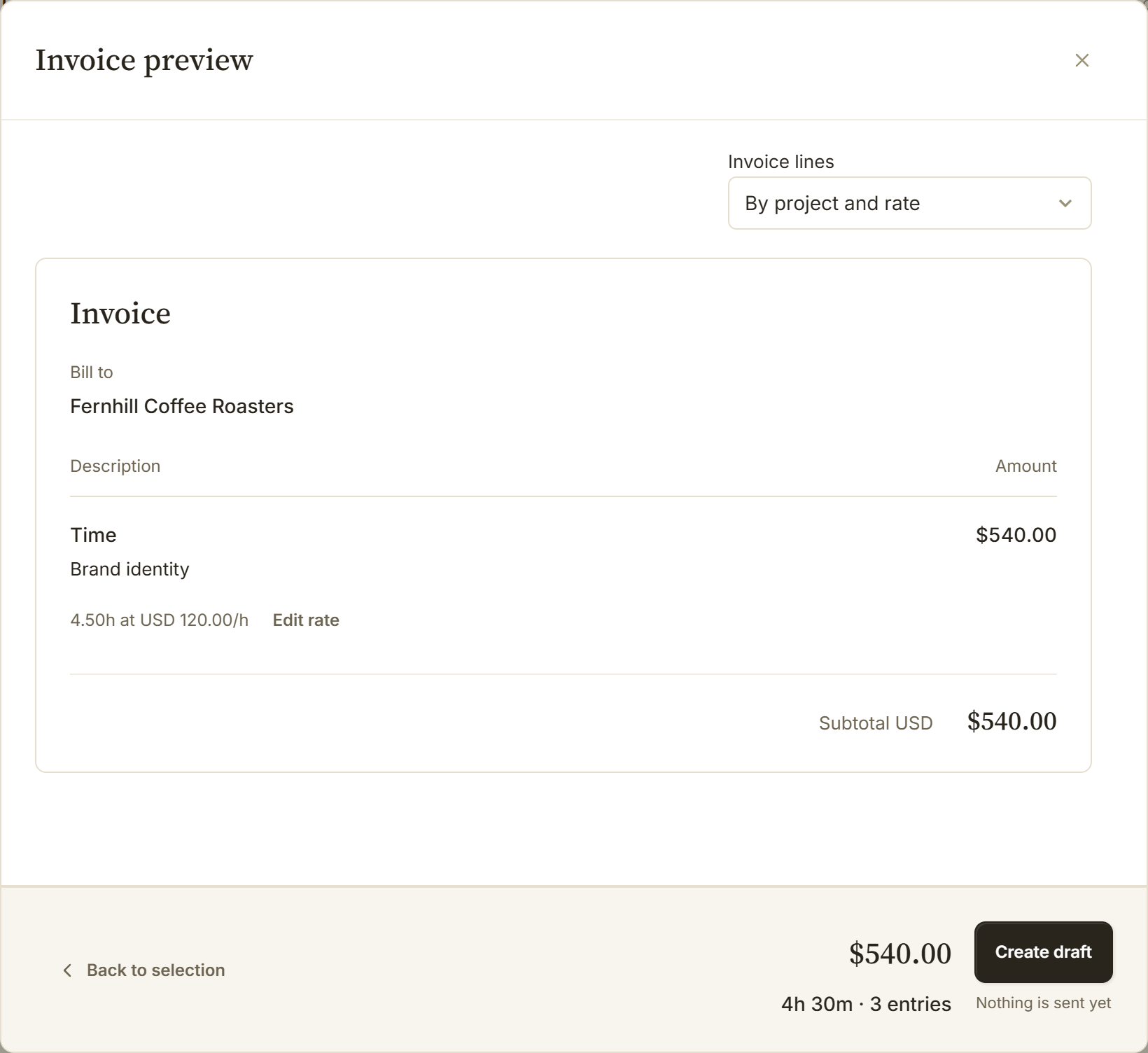
Record time against the project, keep billable expenses with it, then review the work before creating the invoice. The total has a record behind it.
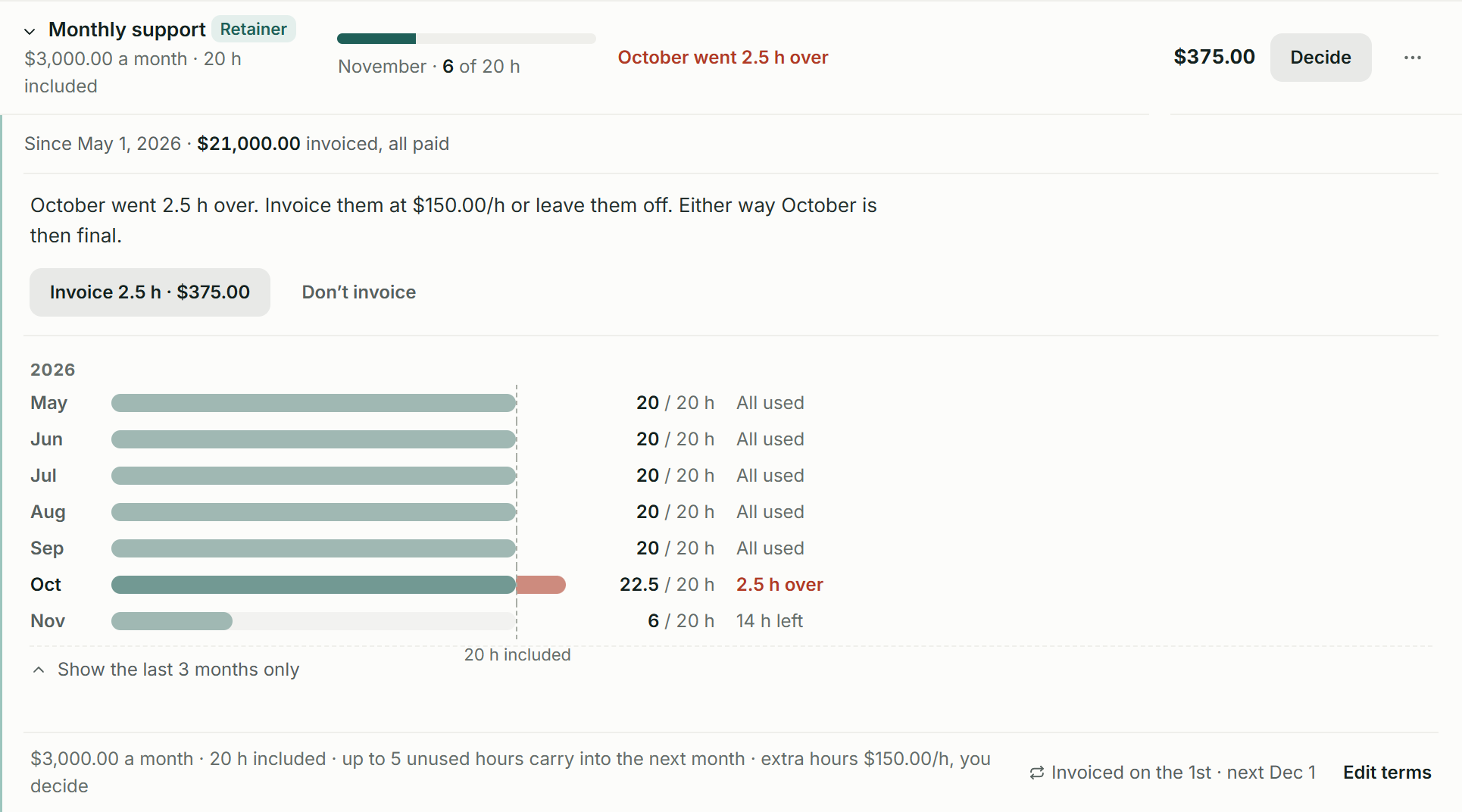
See the retainer period, hours used, capped carry-over and extra work awaiting your billing decision. A repeating charge is only one part of the agreement.
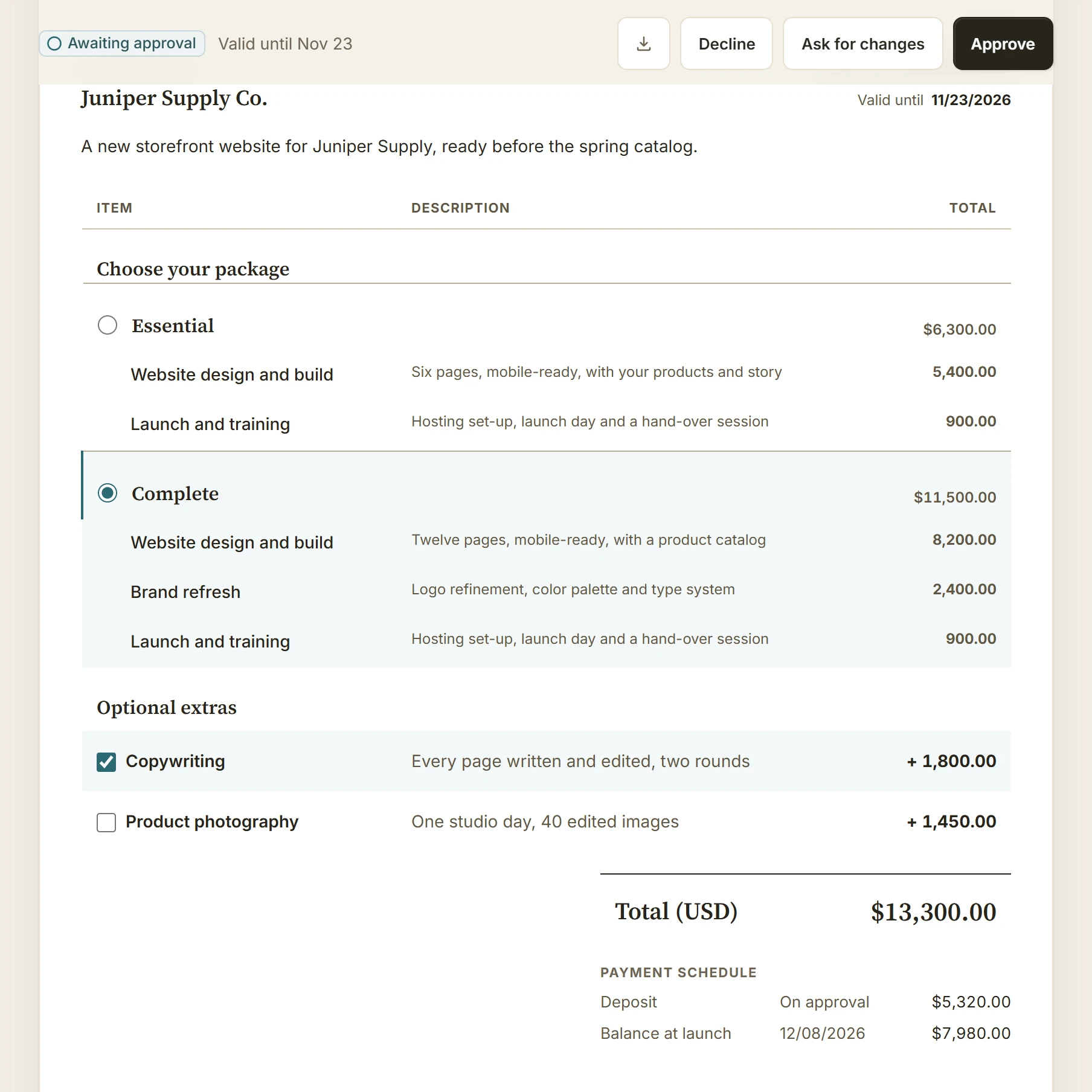
Offer package choices and optional extras in every BillGrid plan. Square’s multi-package estimates require Plus or Premium; its current Plus bundle is $49 per location a month.
Built around service work
Actual BillGrid screens with illustrative work. See the choices that matter when the job lasts longer than the checkout.
From work to invoice
Here, 4.5 hours of brand identity work at $120 make a $540 invoice before tax. Check the entries, their saved rates and the grouping the client will see before creating the draft. Bring billable project costs into the same workflow.

Retainers on Pro and Team
Monthly support includes 20 hours for $3,000. November has 14 hours left. October’s extra 2.5 hours await a decision: invoice $375 or leave them off. The carry-over cap is 5 hours, with the period history still visible.

Estimates
Offer Essential and Complete packages with optional extras on one estimate. Keep the selected scope with the agreement and project. When the approved estimate has a deposit scheduled, BillGrid issues its invoice in the approval step.

Your client experience
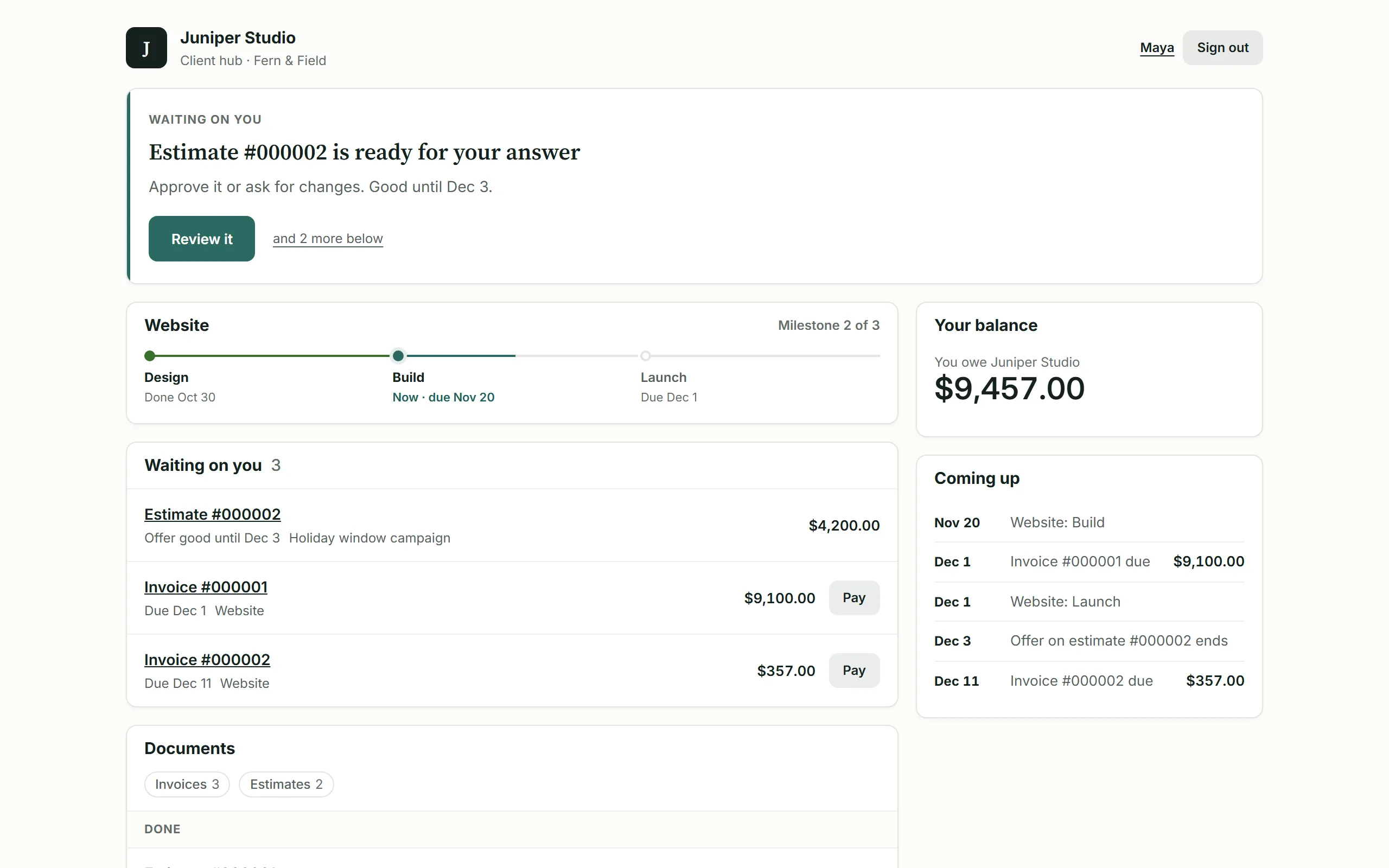
On Pro and Team, share project progress, approvals, invoices and files. Give the payer billing access and the project contact the shared work they need. Documents emailed to a contact remain visible to that recipient.

Put it to work on your next invoice.Start with one client and a real piece of work.
Start for freeThe price, in perspective
Choose the features and volume you need. See the relevant plans side by side.
BillGrid is free for three active clients and three documents a month, with unlimited projects on every plan. Pro, with unlimited clients and invoices, is $10 a month.
Explore BillGrid plansUS list prices, billed monthly. Introductory offers excluded.
Prices checked .
Count invoices, estimates and contracts you issue. They share BillGrid Free’s monthly allowance.
BillGrid Pro is $10 a month; Square Free has no subscription charge, Plus is $49/month and Premium $149/month per location. Online invoice processing costs are separate.
Choose the billing workflow
BillGrid’s estimate choices and signing are included in every plan. Pro adds unlimited clients and invoices for $10 a month. Square’s package estimates require its paid bundle.
With Square funds going to an external bank, ten $2,000 US ACH payments cost $200 on Free or $100 on Plus, against $50 through Stripe with BillGrid. Add subscriptions separately. Eligible Square Checking accounts can have $0 invoice ACH processing; that waiver is outside this calculation.
Team includes three people for $25 a month. Choose the clients a teammate can reach and whether they can view or manage billing.
Side by side
Square’s current US bundles are Free, Plus and Premium. Older Invoices subscriptions can have different terms.
| Feature | BillGrid Free, $10 a month (Pro), $25 (Team) | Square Invoices Free; Plus $49/month; Premium $149/month, per location |
|---|---|---|
| From scope to billing | ||
| Estimate packages | Client-selectable packages and optional extras in every plan | Plus and Premium Multi-package estimates |
| Contracts with e-signature | Standalone or with an estimate; the signer verifies their email | Contracts and e-signatures, including Free |
| Project time and costs | Recorded hours at saved rates, milestones and billable expenses reviewed for an invoice | Project workspace for estimates, contracts, invoices and payment milestones; check the time-billing workflow you need |
| Online payment methods | Cards, available Apple Pay or Google Pay, or eligible USD bank payments through your own Stripe account | Supported cards, ACH, Cash App Pay and Afterpay on eligible invoices |
| Included-hours retainer workflow | Pro, $10 and up: period history, capped carry-over and a decision on extra billing | Recurring invoices and subscriptions; the reviewed guides do not describe the hours-ledger workflow shown above |
| Deposits and staged payments | 2 to 12 named, dated parts on one invoice; client can pay the amount due or another amount | Plus and Premium for milestones Free includes a deposit and balance; paid plans allow up to 12 milestone payments plus the initial deposit |
| Recurring invoices | Pro, $10 and up: weekly to yearly; optional client-authorized saved-card autopay on eligible invoices | Recurring invoices and card-on-file payments, including Free |
| Automatic reminders | Pro, $10 and up: ready schedules or custom steps before and after the due date; pause one invoice | Automatic email reminders with chosen dates; not supported for text-message delivery |
| Automatic late fees | Pro, $10 and up: a percentage, a flat fee or both; once or repeating; optional cap | Invoice late fees; payment schedules cannot be combined with late fees |
| Client portal | Pro, $10 and up: shared project progress, approvals, files, invoices and conversations; individual contact scopes | Invoice links and project estimate, contract and payment records; compare the sharing experience you need |
| Point of sale and booking | Project and billing workspace; keep your point-of-sale or appointment tool | Square POS, hardware and appointments, with plan-specific features |
| Working on your phone | Use the workspace in your phone browser, with no app to install. BillGrid has no native mobile app | Native Square Invoices and Square business apps, plus the web dashboard |
| Subscriptions and online invoice fees | ||
| Starting price | Free for three active clients and three documents a month; Pro $10 a month, or $8 a month billed yearly | Free; Plus $49/month or Premium $149/month per location |
| Clients and invoices | Unlimited on Pro and Team; three active clients and three documents a month on Free | Unlimited invoices on Free; no active-client cap shown |
| More people | Team includes three people for $25; $5 a month per additional person | Bundle subscriptions are per location; not modeled as per-user charges |
| Online invoice card fees | Stripe standard US domestic cards: 2.9% + 30¢; no added BillGrid fee | 3.3% + 30¢ on Free; 2.9% + 30¢ on Plus and Premium |
| Online invoice ACH fees | Stripe: 0.8%, capped at $5 per payment | 1%, $1 minimum; no cap on Free, $10 cap on Plus and Premium |
Switching
Export customers from Square’s Customer Directory to CSV. Prepare the client and contact columns with BillGrid’s example file, then review the import before saving. Our guide shows how to prepare and review your CSV.
BillGrid shows what it found in the file, and what it skips, before anything is saved.
Check the client, work and balance. Connect Stripe if you want online payments, then send when you are ready.
Customer import does not move Square invoices, payments, contracts, stored cards, subscriptions or hardware settings. Keep those records in Square and begin with the next project.
Free supports three active clients. If your reviewed import would go over that allowance, choose Pro or Team before importing.
Questions
Square Free is a capable option for sending unlimited invoices and taking payments. Choose BillGrid when the work behind the invoice needs its own record: project time at saved rates, billable costs, client-selectable packages and an included-hours retainer workflow.
You can try BillGrid Free within three active clients and three documents a month. Pro and Team add unlimited clients and invoices.
Yes. Contracts and e-signatures are included on Free. Free also supports a deposit and balance; Plus and Premium add milestone schedules and multi-package estimates. Compare the project-hours, retainer and client-access workflow shown above alongside your actual subscription and payment costs.
Standard US online invoice rates with Square funds deposited to an external bank. Square Free uses 3.3% + 30¢ for cards and 1% ACH with a $1 minimum and no cap. Plus and Premium use 2.9% + 30¢ for cards and cap invoice ACH at $10. BillGrid uses Stripe’s standard US domestic-card rate of 2.9% + 30¢ and ACH Direct Debit at 0.8%, capped at $5. Other processor charges can apply.
Eligible Square Checking accounts can have $0 invoice ACH processing. That waiver, manual/card-on-file rates, in-person and Payments API rates are not modeled. Payment fees count only when the calculator’s payment section is open.
Yes. Use BillGrid for the projects and invoices you choose while keeping Square for other business activity. BillGrid online invoice payments use your own Stripe account; it does not connect Square hardware, synchronize Square payments or import saved payment details.
They stay in Square. Review future billing dates before recreating a schedule in BillGrid, and stop any duplicate future charge in the original tool when you switch that client. Keep earlier payment and signing records available for reference.
Yes. On Pro and Team, enable automatic payments and the required advance reminder. Your client confirms their identity and opts in when saving a card. Eligible invoices sent at least three days ahead charge on their due date. The client can skip an invoice or stop automatic payments. Payment schedules and saved-bank autopay are not included. See eligibility and controls.
Start with your next invoice. Add a client, bring in the work and see how BillGrid fits.
Free for three active clients and three documents a month. Pro and Team add unlimited clients and invoices.
Start for freeSquare Invoices is a trademark of its owner. BillGrid is independent and isn’t affiliated with, endorsed or sponsored by it. Its facts come from its public pages on Nov 12, 2026: current invoice plans and processing rates, estimate packages, deposits and payment stages, project workspace and customer sharing, reminders and the Square Checking ACH waiver, recurring invoices, customer CSV export and separate card-migration process and invoice apps; Stripe’s from Stripe pricing. Prices are US list prices billed monthly, before any introductory offer. Payment examples use standard US domestic card and ACH rates. International cards, currency conversion, bank verification and other processor charges can cost more; your Stripe agreement applies. Spotted something out of date? Tell us.