The hours are tracked. Give the client a way to pay.
Keep the signed scope, billable work and next payment together. BillGrid brings client payment collection and included-hours retainers into the same workspace you use to run the job.
No card needed·Free for three active clients and three documents a month·Pro from $10/month
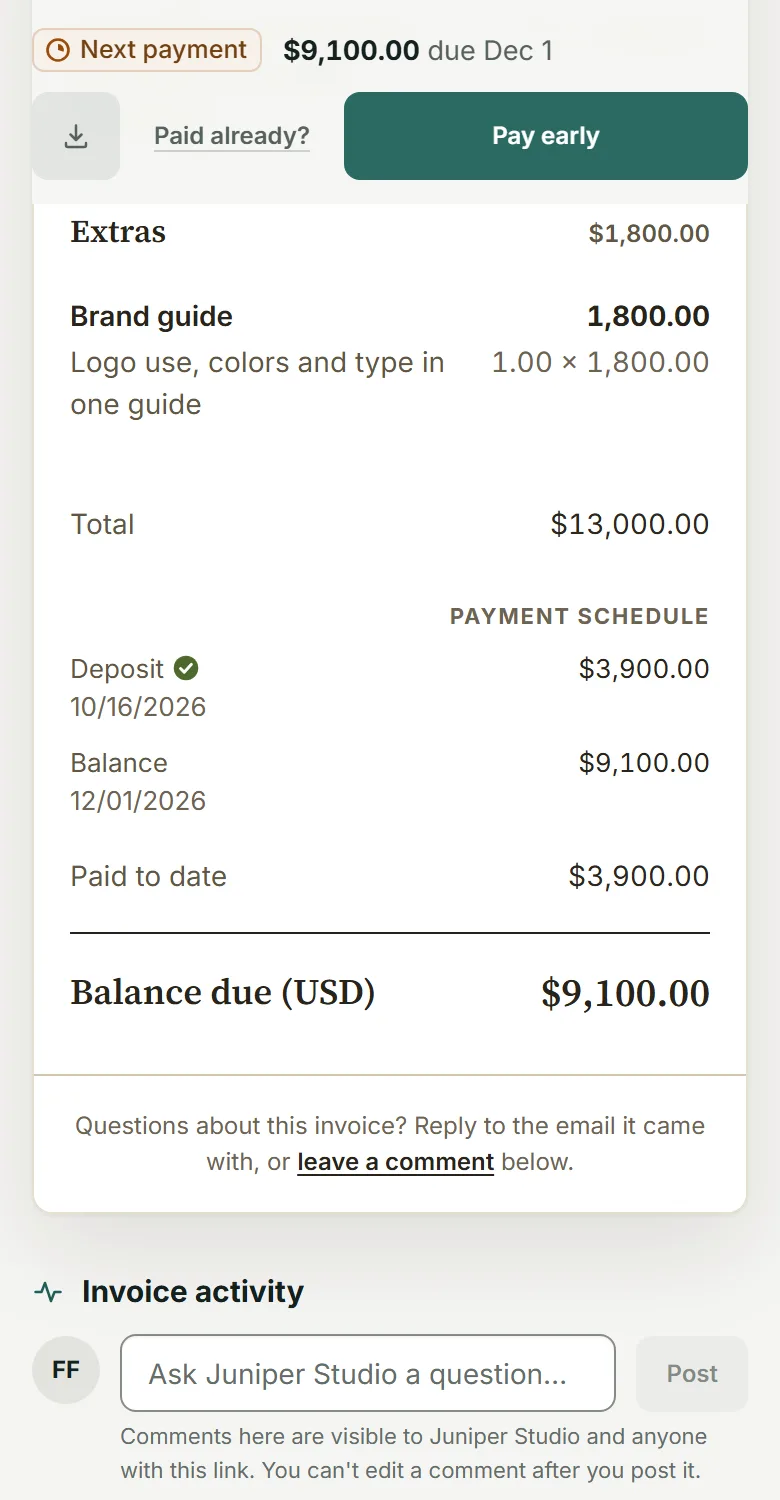
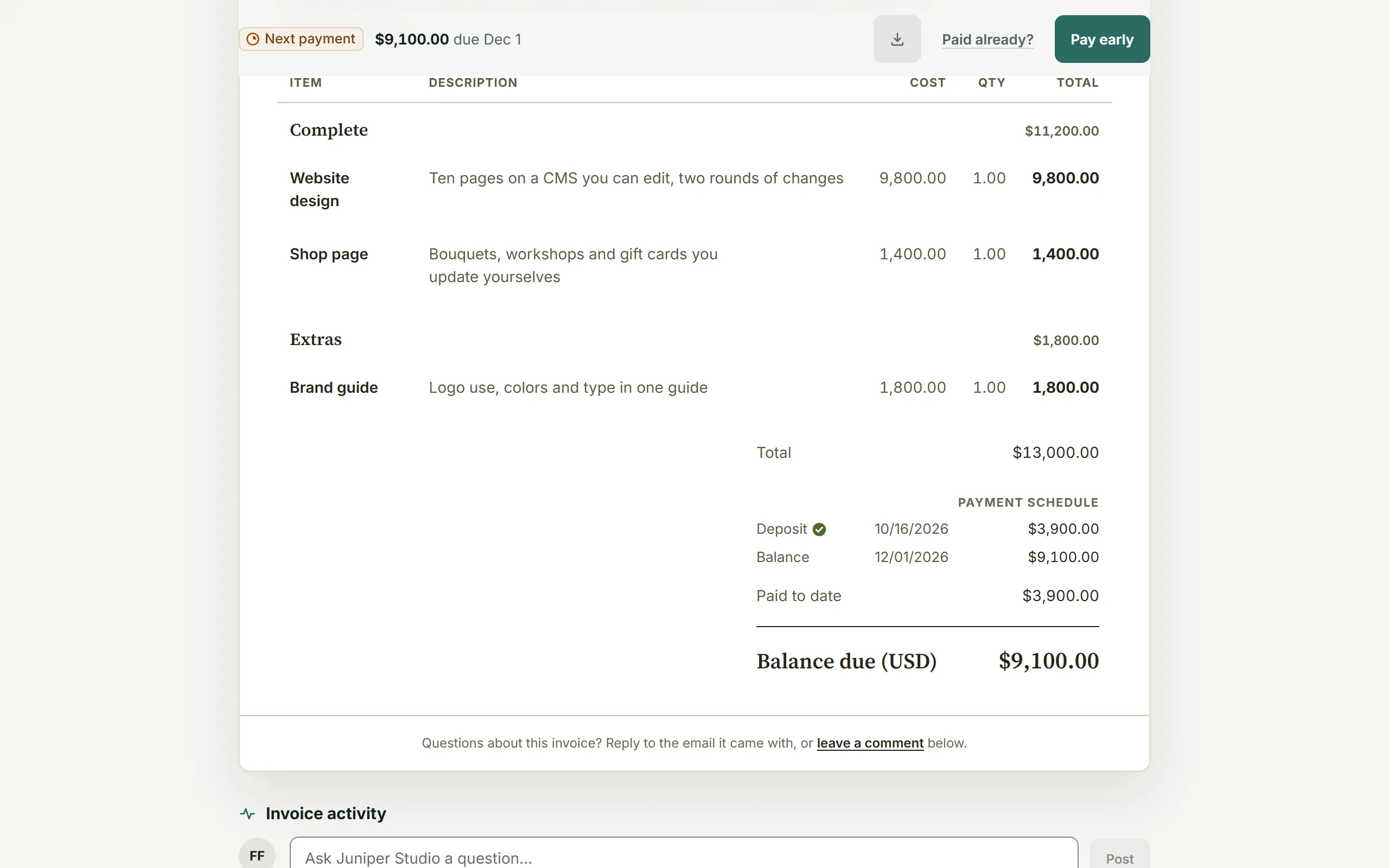
The deposit received, the balance due and the client’s next paymentView full size
Why choose BillGrid over Clockify?
The hours have a record. So does the agreement.
For a studio or consultancy, billing starts with the scope and ends with the payment. Keep both connected to the work you deliver.
Put payment on the client’s invoice.
Clients open the bill and pay through your own Stripe account. Keep the amount due, partial payments and remaining balance together. Clockify creates invoices; its own comparison says payment collection needs an external tool.
Keep last month’s retainer decision.
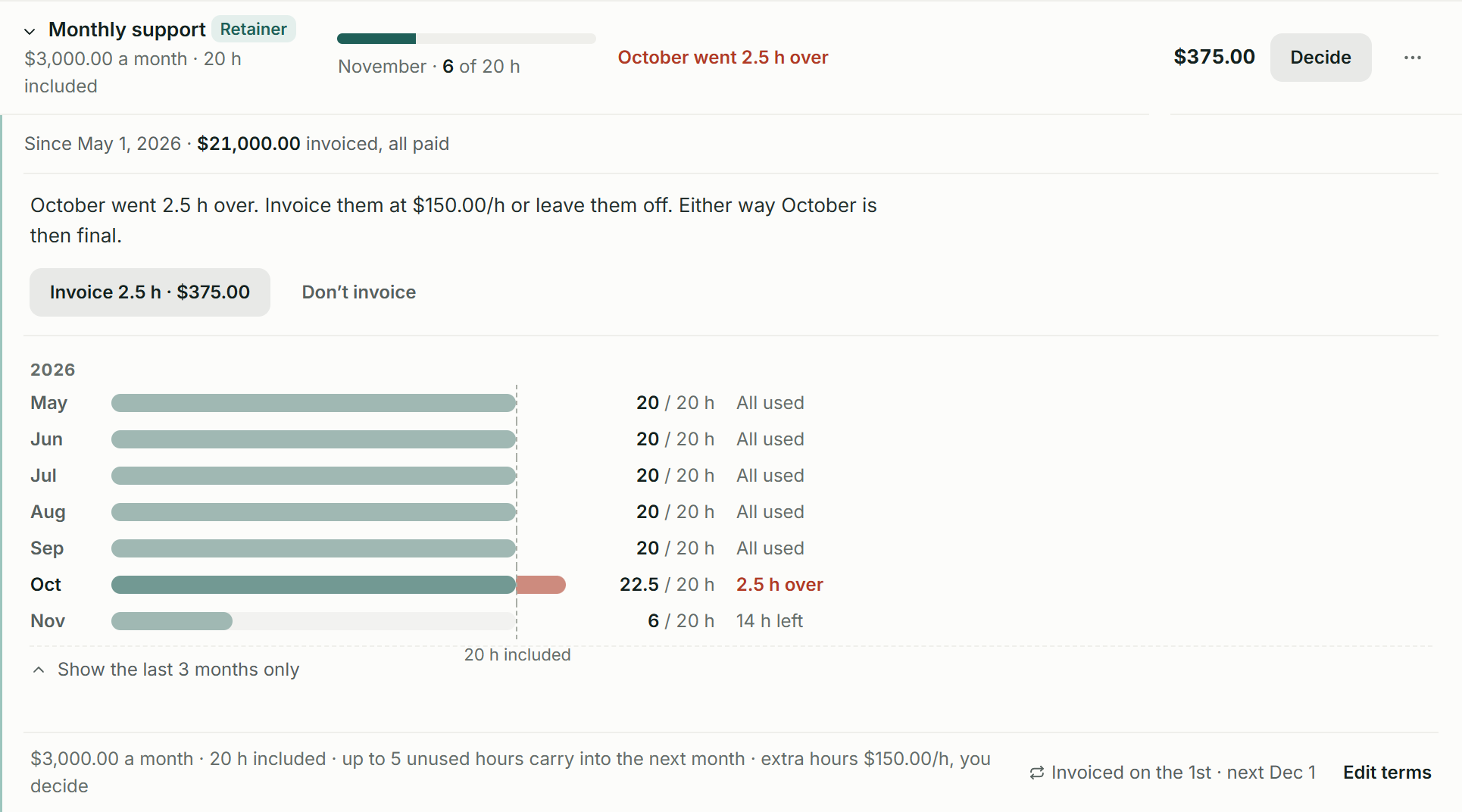
On Pro and Team, see settled periods, cap unused-hours carry-over and decide whether extra work should become a charge. Keep the agreement’s allowance beside the monthly fee.
Agree the work before it becomes hours.
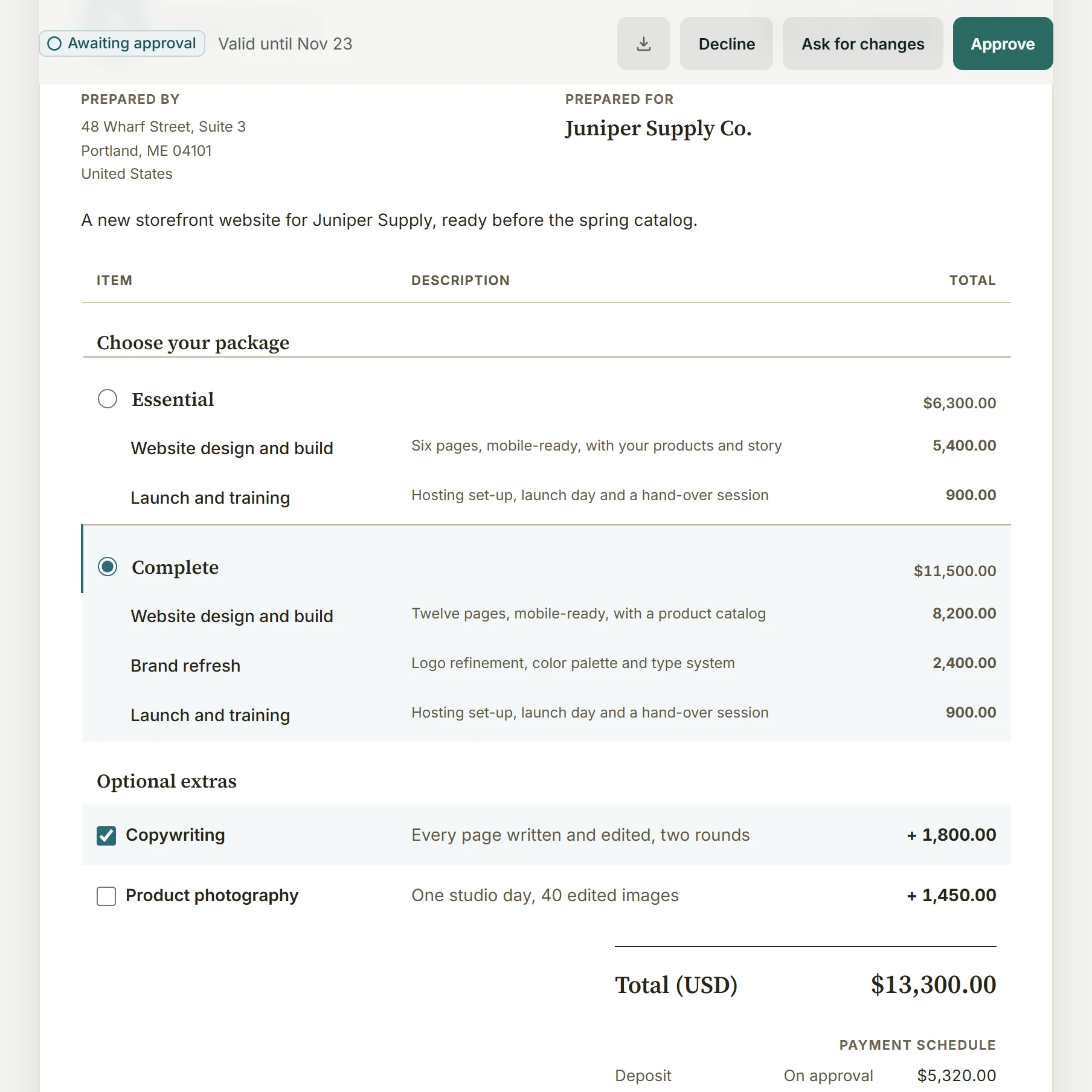
Offer a choice of packages and extras, attach the agreement and keep linked change orders when the scope grows. The client’s decision stays with the project and its bill.
The price, in perspective
Compare your monthly cost.
Compare the subscriptions for your team. Clockify Standard already creates invoices; payment collection and specialist workforce needs are separate decisions.
BillGrid is free for three active clients and three documents a month, with unlimited projects on every plan. Pro, with unlimited clients and invoices, is $10 a month.
US list prices, billed monthly. Introductory offers excluded. Prices checked .
What you’d pay each month
List prices
Count invoices, estimates and contracts you issue. They share BillGrid Free’s monthly document allowance. Both client and document counts determine whether Free fits.
You also need
Starts with three people and Create client invoices selected, requiring Clockify Standard. Turn it off to compare tracking only; select Expenses only if you need that Pro feature. Client and document inputs measure BillGrid’s allowance, not permission to invoice on Clockify Free.
BillGrid /mo
Clockify /mo
Clockify Standard creates invoices at $6.99 per seat/month; three people are $20.97. Clockify Pro costs $9.99 per seat/month. BillGrid Team includes three people for $25 a month.
Real BillGrid screens with illustrative work. See the decisions behind an ongoing service relationship.
Retainers on Pro and Team
Close the period. Keep the decision.
Monthly support is $3,000 for 20 hours. November has 14 hours left. October’s extra 2.5 hours leave a $375 decision: invoice the work or leave it off. On Pro and Team, keep settled periods and carry unused hours forward within the five-hour cap shown here.
Clockify
Clockify supports recurring time and money budgets. Its help says project status shows the current cycle and recommends exporting before a reset to compare past periods. BillGrid keeps the settled retainer periods and extra-billing decisions in this ledger.
Offer Essential and Complete packages with optional extras, attach your service agreement and keep the chosen scope. With a deposit scheduled, approval issues the deposit invoice. Linked change orders preserve the original agreement when the client asks for more.
Clockify
Clockify’s invoicing workflow brings tracked hours and expenses onto a bill. BillGrid also connects the earlier client decision: the package they choose, the agreement they sign and the deposit they owe.
On Pro and Team, share Working_proofs.pdf while the job is in progress and hold Final_brand_files.zip until its invoice is paid in full. The client sees what is waiting, and BillGrid emails them when the files become available.
Clockify
Clockify emails invoice PDFs and can include time and expense reports. BillGrid connects client payment collection to this separate delivery rule for selected final files.
A client billing workspace. With the work behind it.
Keep collection with the bill.
BillGrid clients can pay the amount due, the full balance or another amount through Stripe. Set 2 to 12 named, dated payment parts on one invoice. Clockify can record partial payments; its native invoicing does not collect them.
Choose the plan you actually need.
Three people on Clockify Standard cost $20.97 a month. BillGrid Team includes three people for $25. If your Clockify workflow also needs its expense feature, three Pro seats cost $29.97. Processing and external tools are separate from these monthly subscriptions.
Start with the next period.
Keep the Clockify reports you need for earlier work. Try the next project or retainer period in BillGrid, agree the opening terms and check the first invoice. Decide which system bills that client before recreating a recurring schedule.
Side by side
Compare the client bill and the team’s time.
Clockify’s current plans are shown here. Its internal time estimates, monetary budgets and client invoices serve different jobs.
Included
On a higher plan
Not offered
See details
Feature
BillGrid Free, $10 a month (Pro), $25 (Team)
Clockify Free; Basic $4.99; Standard $6.99; Pro $9.99; Enterprise $14.99 per seat/month
The client agreement and payment
Client payment collection
Cards, available Apple Pay or Google Pay, or eligible USD bank payments through your own Stripe account
Creates invoices; its own comparison says payment collection requires an external tool
Invoices from recorded work
Review hours at saved rates, milestones and billable costs before creating the draft
Standard and up Import time onto invoices, choose line grouping and mark the work as invoiced
Billable expenses
Enter or import project costs and bring billable expenses onto an invoice
Pro and up Record expenses, attach receipts and add costs to invoices
Client scope and agreements
Client-selectable packages and extras, signed contracts and linked change orders; deposit invoiced on approval
Time estimates and monetary budgets track project progress; invoicing brings recorded work onto the bill
Included-hours retainer workflow
Pro, $10 and up: settled periods, capped carry-over and an explicit extra-billing decision
Recurring estimates and budgets reset by period; project status shows the current cycle, with exports advised for historical comparison
Deposits and partial payments
2 to 12 dated parts on one invoice; clients can pay what is due, the full balance or another amount
Record full or partial payments against an invoice; collection happens through your external payment workflow
Recurring invoices
Weekly to yearly; review-first on Free, automatic sending on Pro and Team; optional client-authorized saved-card autopay on Pro and Team for eligible invoices
Standard and up Automatically creates invoices at custom intervals and notifies invoice managers to review them
Automatic reminders
Pro, $10 and up: ready schedules or custom steps before and after the due date; pause one invoice
Daily overdue emails and in-app notifications go to invoice managers
Automatic late fees
Pro, $10 and up: a percentage, a flat fee or both; once or repeating; optional cap
Confirm automatic fee options with Clockify; its invoices support manually entered charges
Files released after payment
Pro, $10 and up: share working proofs now; selected final invoice files unlock after payment in full
Invoice PDFs and supporting time/expense reports; compare your separate project-file handover
Client access
Pro, $10 and up: private project progress, approvals, invoices, files and conversations; individual contact scopes
Live report links on paid plans: public links or access limited to selected workspace groups
Tracking and workforce tools
Time tracking
Timer, typed line, calendar and weekly timesheet, with saved billing rates
Web, native apps and browser extensions; a personal app/website tracker; billable rates from Basic
Timesheet approval and locking
Review the invoice draft; no formal employee timesheet approval or locking workflow
Standard and up Submit team time for approval and lock past entries
Attendance and time off
Client project time and billing; keep your attendance and leave system
Standard and up Attendance, overtime, time-off requests and balances
Resource capacity and profitability
No resource-capacity or labor-cost profitability suite
Pro and up Team scheduling, forecasts, labor costs and profitability
Working on your phone
Use the workspace in your phone browser, with no app to install. BillGrid has no native mobile app
Native desktop, iPhone and Android tracking apps; creating invoices uses the web app
Subscriptions and records
Starting price
Free for three active clients and three documents a month; Pro $10 a month, or $8 a month billed yearly
Free for tracking; Basic costs $4.99 per seat/month; creating invoices requires Standard at $6.99
Team subscriptions
Team includes three people for $25; $5 a month per additional person
On paid plans, every active or invited workspace member needs a paid seat, including the owner
Free-plan scope
One person; three active clients and three documents a month; unlimited projects, time and expenses
Up to five active people for time tracking; billable rates start on Basic, invoice creation on Standard
Reporting exports
CSV and Excel work and billing reports
PDF reports on Free; paid plans add CSV/Excel reports. Free owners can export the current year’s time archive as CSV
Switching
Bring your clients. Make your next invoice.
Prepare the clients for your next billing period
Prepare a client and contact CSV using BillGrid’s example headers. Keep your Clockify time and invoice exports separately; review the contact names, emails and billing addresses you want to bring. Our guide
shows how to prepare and review your CSV.
Import them into BillGrid
BillGrid shows what it found in the file, and what it skips, before anything is saved.
Review your next invoice
Check the client, work and balance. Connect Stripe if you want online payments, then send when you are ready.
This is a reviewed client-list import, not a connected Clockify migration. It does not recreate time entries, budgets, invoices, payments, approvals or leave balances. Keep the originals and agree which system will issue each client’s next invoice.
Free supports three active clients. If your reviewed import would go over that allowance, choose Pro or Team before importing.
It depends on the people, features and billing cycle. Three Clockify Standard seats are $20.97 a month; BillGrid Team includes three people for $25. Standard can cost less for a small team. Choose BillGrid for the connected client agreement, payment collection and retainer controls you need. Select expenses in the calculator only if you need Clockify’s Pro expense feature. Processing and external tools are excluded from those subscription totals.
Which Clockify plan does the calculator start with?
Three people creating client invoices, on Standard at $6.99 per seat a month. Turn off Create client invoices to compare tracking only. Free supports up to five active users; Basic at $4.99 adds billable rates but does not create invoices. The comparison uses current monthly plans, not annual discounts, trials or an older account’s terms.
Can I move my whole Clockify workspace?
The client-list import shown here does not copy a Clockify workspace or its history. Prepare the contacts for your next job, retain your original time and invoice reports, and review the next billing period before sending anything. Clockify’s regular CSV/Excel report exports require a paid plan; Free owners also have a current-year time archive. Check BillGrid’s import formats before preparing historical data.
Does Clockify already invoice time and expenses?
Yes. Standard creates invoices from recorded time, with grouping and invoiced markers; Pro adds the expense feature. Clockify can create recurring invoices automatically and notify invoice managers to review them. It also records partial payments. BillGrid Pro and Team can also send recurring invoices automatically. For collection, Clockify needs an external payment tool; BillGrid clients pay from their invoice through your Stripe account.
How does a BillGrid retainer differ from a recurring Clockify budget?
Clockify can reset time estimates and monetary budgets weekly, monthly or yearly. Its help says project status shows the current cycle and recommends exports for comparing earlier periods. BillGrid keeps the fee and included hours with the project. Free can configure a retainer and show current usage. Pro and Team add settled-period history, capped unused-hours carry-over and the decision to invoice extra work or leave it off.
Can clients sign the scope before work starts?
Send an NDA or service agreement on its own, or attach a contract to your estimate so the scope and terms are approved together.
Start from a template or use your own clauses. Your client verifies their email and types their name to sign;
an authorized representative signs for your business. Keep the agreement and signing record with the client.
On an unpaid account, first email that client an invoice or estimate.
See the signing workflow and records.
What if I use Clockify for attendance or payroll?
Keep the tools your workforce needs. Clockify Standard includes attendance, overtime, time off and formal timesheet approvals; Pro adds scheduling and labor-cost analysis. Its payroll workflow exports hours to software that runs payroll. BillGrid does not replace attendance, leave management or payroll processing. If you keep Clockify alongside BillGrid, budget for both subscriptions.
Can clients save a card and pay automatically?
Yes. On Pro and Team, enable automatic payments and the required advance reminder. Your client confirms their identity and opts in when saving a card. Eligible invoices sent at least three days ahead charge on their due date. The client can skip an invoice or stop automatic payments. Payment schedules and saved-bank autopay are not included. See eligibility and controls.
Your next client project. Clear through to payment.
Agree the scope, record the work and give the client one invoice to pay.
Free for three active clients and three documents a month. Pro and Team add unlimited clients and invoices.