Growth without a client-count upgrade.
Pro and Team include unlimited clients and invoices, from $10 a month. FreshBooks Lite allows 5 clients; Plus allows 50.
Compare BillGrid vs FreshBooks
Pro and Team give you unlimited clients, with their proposals, signed agreements, project hours and invoices together. Grow the client list. Keep the detail that makes each job yours.
No card neededFree for three active clients and three documents a monthPro from $10/month

The BillGrid advantage
Pro and Team include unlimited clients and invoices, from $10 a month. FreshBooks Lite allows 5 clients; Plus allows 50.
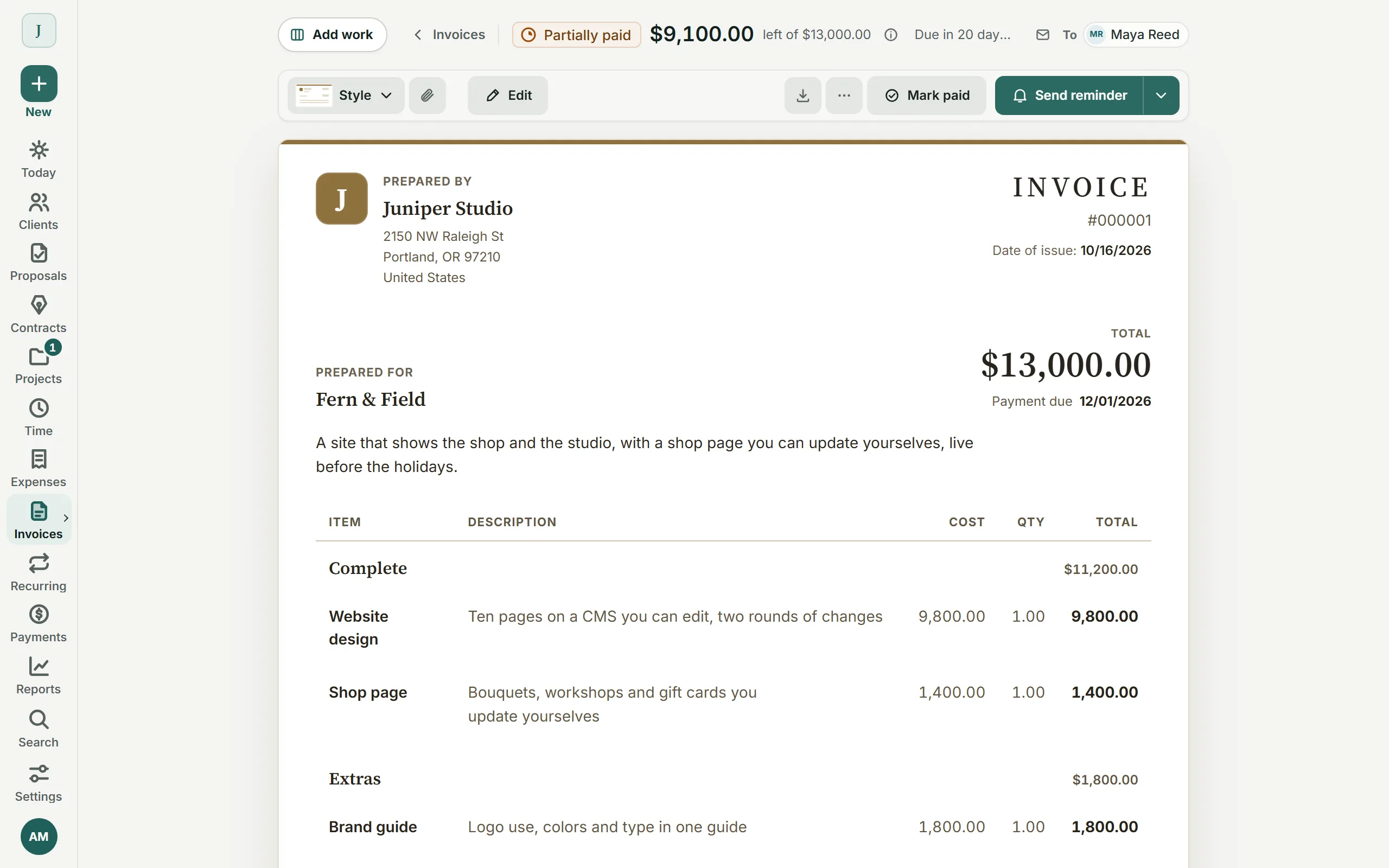
Keep the proposal, signed scope, project progress and balance together. Every client has a home beyond the invoice you last sent.
On Pro and Team, carry unused retainer hours within the cap you agree. FreshBooks tracks retainer hours too; its guide says unused time does not roll into the next period.
What you’d use every day
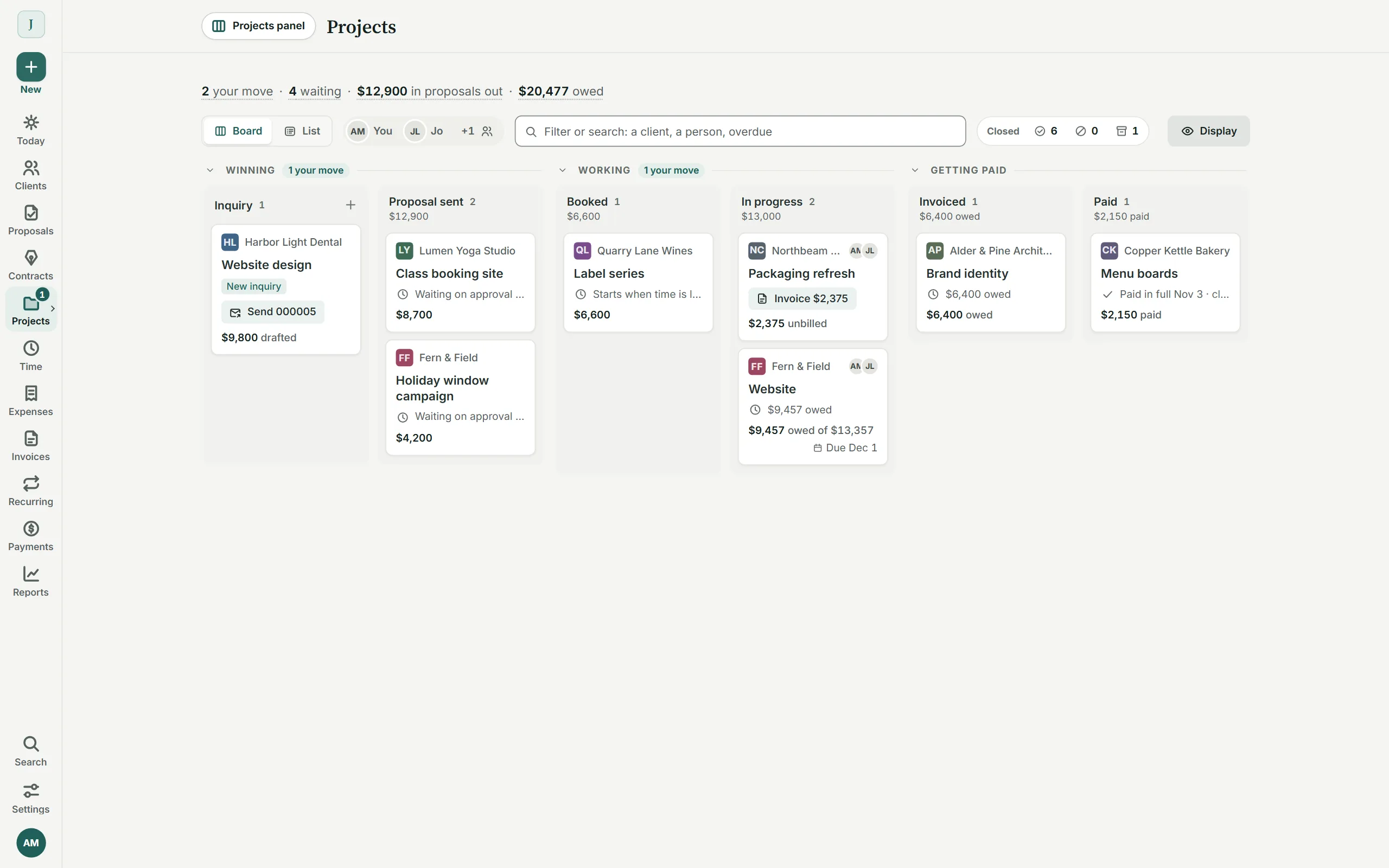
A growing client list needs more than a place to send invoices. Connect the agreed work, the project and the bill. Real BillGrid screens with illustrative clients.
The whole job
Give each job a place for the chosen scope, tasks, hours and balance. Keep repeat clients and one-off projects in view as the client list grows; unlimited clients are included with Pro and Team.

Packages and signed scope
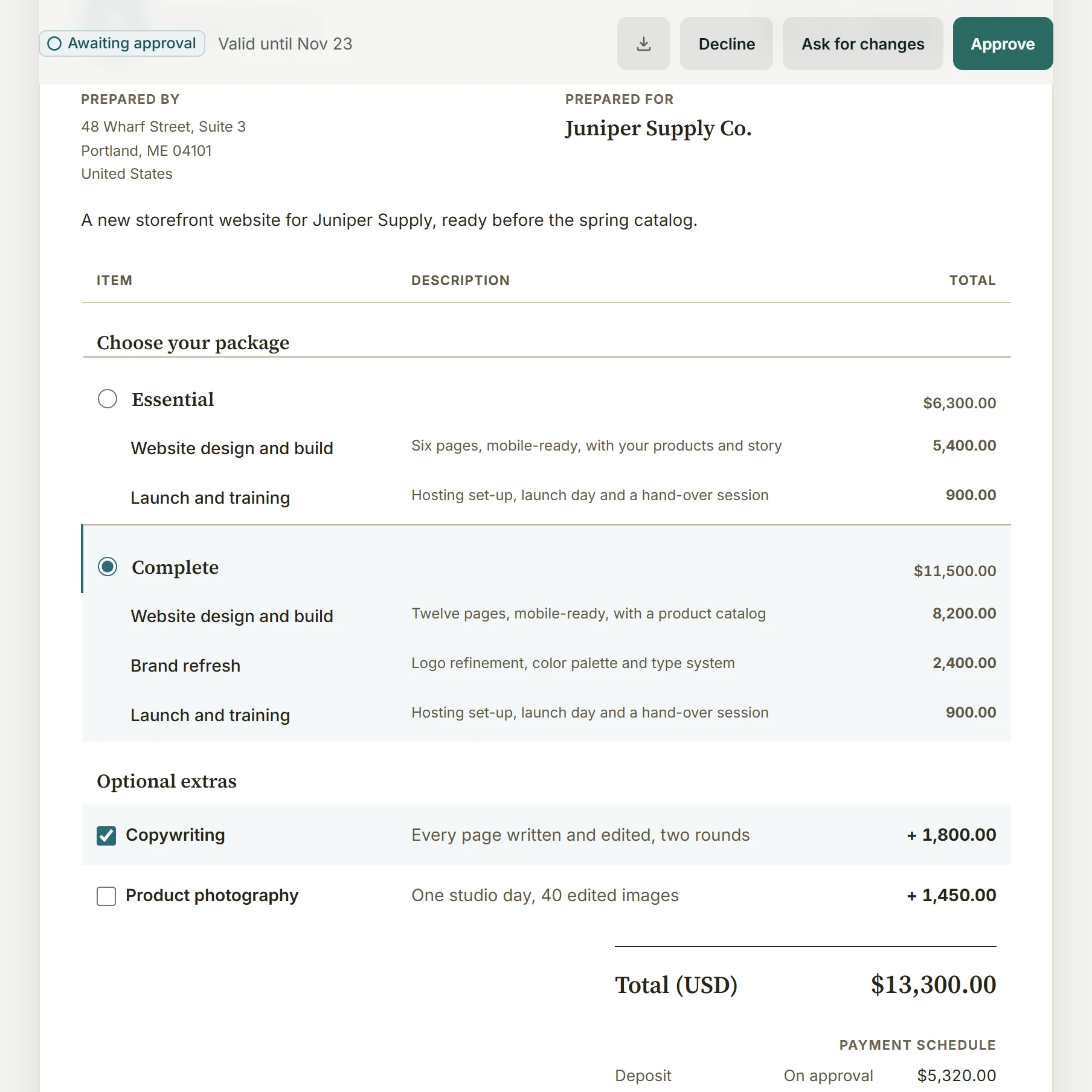
Give clients a choice of packages and extras, with a contract attached to the estimate. Keep the chosen work, agreed terms and deposit together as the project begins.

Retainers on Pro and Team
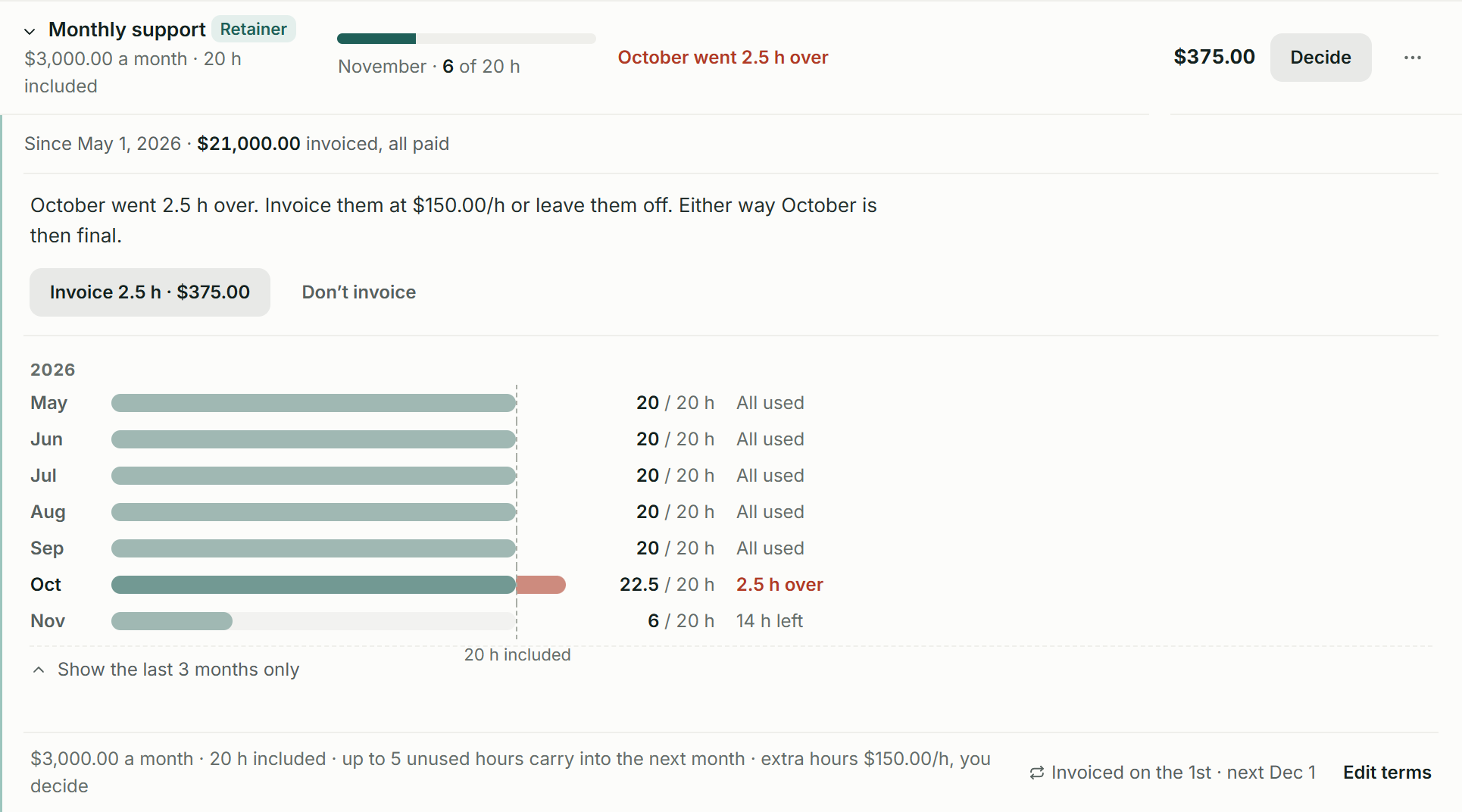
A $3,000 support agreement includes 20 hours. Here, November has 14 left; October’s extra 2.5 hours wait for your $375 billing decision. Pro and Team keep that period history with a five-hour carry-over cap.

Put it to work on your next invoice.Start with one client and a real piece of work.
Start for freeWhy BillGrid
An agreement to sign. Retainer hours to draw down. A polished invoice to send. BillGrid keeps the work behind the balance in one place, with unlimited clients on Pro and Team.
Built for your billing
FreshBooks scope
The price, in perspective
Choose the features and volume you need. See the relevant plans side by side.
BillGrid is free for three active clients and three documents a month, with unlimited projects on every plan. Pro, with unlimited clients and invoices, is $10 a month.
Explore BillGrid plansUS list prices, billed monthly. Introductory offers excluded.
Prices checked .
BillGrid Pro is $10 a month with unlimited clients; FreshBooks Lite is $23 a month for 5 clients, and Plus is $43 for 50.
Side by side
BillGrid against FreshBooks’ own pricing and help pages. Where FreshBooks needs a higher plan, the row says which.
| Feature | BillGrid Free, $10 a month (Pro), $25 (Team) | FreshBooks Lite $23, Plus $43, Premium $70 |
|---|---|---|
| Getting paid | ||
| Automatic reminders | Pro, $10 and up: before, on and after the due date, on a ready schedule or your own; pause any one invoice | Up to 3 emails, before or after the due date, per client or invoice |
| Automatic late fees | Pro, $10 and up: a percentage, a flat fee or both; once or repeating; optional cap; review each or let it apply | One fee per invoice, a percentage or flat amount |
| Recurring invoices | Weekly to yearly; review-first on Free, automatic sending on Pro and Team; optional client-authorized saved-card autopay on Pro and Team for eligible invoices | Templates can automatically pull unbilled time and expenses |
| Finds repeat charges in past invoices | Reads three years of your sent invoices and offers what a client pays monthly or yearly | Not described in its recurring-template guide |
| Retainers | Pro, $10 and up: included hours, period history, capped carry-over and a decision on extras | Plus, $43 Included-hours retainers; unused time does not carry to the next period |
| Deposits | Yes, with dated payments after it | Yes |
| How clients pay online | Cards, available Apple Pay or Google Pay, or eligible USD bank payments through your own Stripe account; in full or in part | Card, bank transfer, Apple Pay, Google Pay and Buy Now, Pay Later |
| Removing the tool’s branding | Pro, $10 and up: from client pages | Select (custom price), from client emails |
| Estimates, time and work | ||
| Estimates | Packages and optional extras on one estimate; approved by typed name, then invoiced | Unlimited estimates |
| Client signs to approve | Typed estimate approval; contracts can also be signed and countersigned | Plus, $43 and up, with e-signatures |
| Time tracking | Timer, typed line, calendar or weekly timesheet; billed at saved rates | Unlimited time tracking |
| Projects | Project board, tasks, milestones, time and expenses, invoiced together | Project budgets and billing |
| Expenses | Entered or imported from a CSV file | Automatic bank import; receipt scanning on Plus, $43 |
| Invoice designs | 4 styles, in any brand color | 3 templates, preset or custom color, 2 fonts |
| Books and beyond | ||
| Accounting workflow | Billing and reports here; supported invoices and payments copy to QuickBooks Online on Pro and Team (one US company, USD). Double-entry books stay in your accounting app | Plus, $43 and up: double-entry reports, reconciliation and accountant access |
| Payroll | Use your payroll provider alongside BillGrid; payroll is separate | Add-on, $40 a month plus $6 per person |
| AI assistant | Pro, $10 and up: Claude or ChatGPT reads your account, drafts invoices, logs time and sends once you confirm | FreshBooks’ own Claude and ChatGPT connectors answer questions from live account data; both are read-only |
| Working on your phone | Use the workspace in your phone browser, with no app to install. BillGrid has no native mobile app | Native iPhone and Android apps |
| Price and limits | ||
| Starting price | Free for three active clients and three documents a month; Pro $10 a month, or $8 a month billed yearly | $23 a month (Lite), less billed yearly |
| Clients you can bill | Unlimited on Pro and Team; 3 active at a time on Free | Premium, $70 for unlimited; 5 on Lite, 50 on Plus. Archived clients count |
| Invoices and estimates | Unlimited on Pro and Team; three documents a month on Free | Unlimited |
| More people | $5 a month each on Team; Team includes three | $11 a month each, any plan |
| Card payment fees | Stripe’s standard US domestic cards: 2.9% + 30¢; no added BillGrid payment fee | Standard cards: 2.9% + 30¢. Commercial cards, Amex and managed card payments including AutoPay: 3.5% + 30¢ |
Switching
Your clients, Time Entry Details, services, expenses and invoices, each as a CSV file. Our guide walks through each step.
Add them together in Settings, Import data. BillGrid shows the clients, unbilled hours, expenses and open invoices it found, and what it leaves out, before anything is saved.
Check the client, work and balance. Connect Stripe if you want online payments, then send when you are ready.
Open invoices keep their original numbers. Late fees stay off and reminders wait 90 days: record part payments and check each balance before following up. Paid invoices and drafts stay in FreshBooks; keep an export.
Free supports three active clients. If your reviewed import would go over that allowance, choose Pro or Team before importing.
Questions
It depends on your client count, team size, plan and billing cycle. Use the calculator above to compare the setup you need. BillGrid is free for three active clients and three documents a month, and Pro is $10 a month, or $8 a month billed yearly, with unlimited clients. FreshBooks often opens with a discount for the first months, so compare the ongoing cost after it ends.
Bring clients, unbilled time, services, expenses and open invoices through the reviewed CSV import. Open invoices keep their numbers and arrive as sent; paid invoices and drafts stay in FreshBooks. Late fees stay off and reminders wait 90 days. Record part payments before following up, because FreshBooks’ export omits those amounts. Check what each file brings.
Keep the client work, invoices, payments, time and expenses together in BillGrid. Export reports for your accountant in CSV or Excel. Pro and Team copy supported invoices and payments to QuickBooks Online (one US company, USD). Double-entry bookkeeping stays in your accounting app.
Send an NDA or service agreement on its own, or attach a contract to your estimate so the scope and terms are approved together. Start from a template or use your own clauses. Your client verifies their email and types their name to sign; an authorized representative signs for your business. Keep the agreement and signing record with the client. On an unpaid account, first email that client an invoice or estimate. See the signing workflow and records.
Not for standard US cards: both are 2.9% + 30¢. BillGrid payments go through your own Stripe account at Stripe’s rate, and BillGrid adds nothing on top. FreshBooks lists commercial cards, Amex and managed card payments such as AutoPay at 3.5% + 30¢. Compare the payment method you actually use; other processor charges can apply.
FreshBooks documents its own ChatGPT and Claude connections as read-only. On BillGrid Pro and Team, an authorized assistant can log time and prepare invoice drafts. Sending needs a fresh preview and your separate confirmation; connecting alone does not authorize client emails. Existing account and record permissions still apply. See a real billing conversation.
FreshBooks lists additional team members at $11 a month each. BillGrid Pro is for one login; Team includes three people for $25 a month, then $5 per additional person. Compare the full team cost as well as the client allowance.
BillGrid Pro and Team can carry unused hours forward within the cap you set. FreshBooks also tracks included retainer hours, but its guide says unused time does not carry forward and suggests a prepayment credit if needed. Agree the carry-over rule with the client; a fee, an allowance and a cash advance are different arrangements.
No. FreshBooks counts both active and archived clients. Its help says deleting a client frees a slot while preserving their records, and the client can be restored for future billing. BillGrid Pro and Team keep unlimited clients available, so a returning client does not require managing a client-count allowance.
Yes. On Pro and Team, enable automatic payments and the required advance reminder. Your client confirms their identity and opts in when saving a card. Eligible invoices sent at least three days ahead charge on their due date. The client can skip an invoice or stop automatic payments. Payment schedules and saved-bank autopay are not included. See eligibility and controls.
Start with your next invoice. Add a client, bring in the work and see how BillGrid fits.
Free for three active clients and three documents a month. Pro and Team add unlimited clients and invoices.
Start for freeFreshBooks alternative Reviewed