Edit the document itself.
Write the line items, quantities, prices and wording on the invoice. Use Preview to check the paper, and turn on Page breaks to see where a longer document will divide in its PDF.
Features / Invoices
Bring the work, expenses, terms and files into one clear invoice. Review it as your client will see it, send it on your schedule, and keep payment and delivery connected.
Try a business, a style and a color. This is the same invoice design BillGrid uses.

| Item | Description | Cost | Qty | Total | |
|---|---|---|---|---|---|
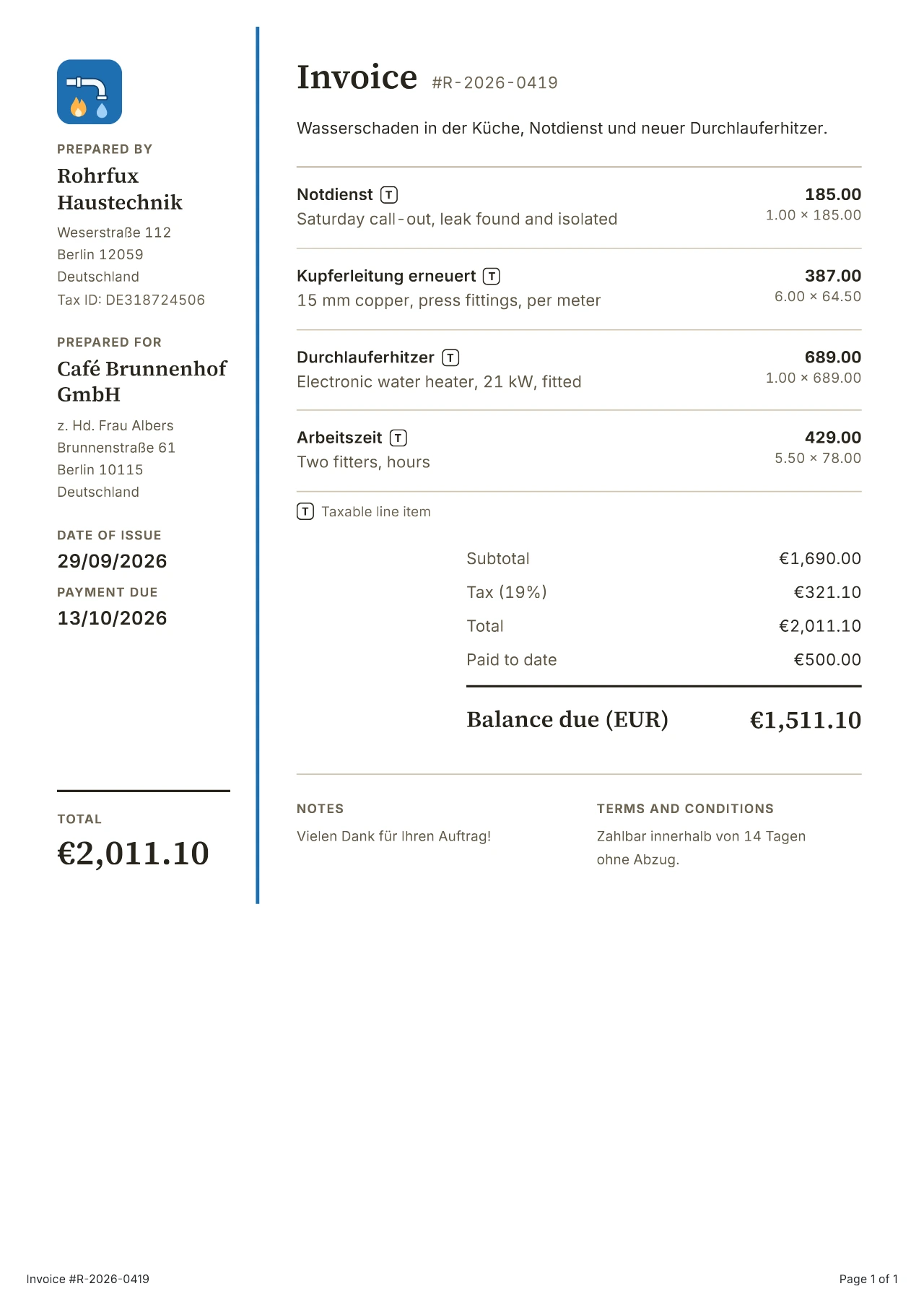
| NotdienstT | Saturday call-out, leak found and isolated | 185.00 | 1.00 | 1.00 × 185.00 | 185.00 |
| Kupferleitung erneuertT | 15 mm copper, press fittings, per meter | 64.50 | 6.00 | 6.00 × 64.50 | 387.00 |
| DurchlauferhitzerT | Electronic water heater, 21 kW, fitted | 689.00 | 1.00 | 1.00 × 689.00 | 689.00 |
| ArbeitszeitT | Two fitters, hours | 78.00 | 5.50 | 5.50 × 78.00 | 429.00 |
Rohrfux Haustechnik| Item | Description | Cost | Qty | Total | |
|---|---|---|---|---|---|
| NotdienstT | Saturday call-out, leak found and isolated | 185.00 | 1.00 | 1.00 × 185.00 | 185.00 |
| Kupferleitung erneuertT | 15 mm copper, press fittings, per meter | 64.50 | 6.00 | 6.00 × 64.50 | 387.00 |
| DurchlauferhitzerT | Electronic water heater, 21 kW, fitted | 689.00 | 1.00 | 1.00 × 689.00 | 689.00 |
| ArbeitszeitT | Two fitters, hours | 78.00 | 5.50 | 5.50 × 78.00 | 429.00 |
| Item | Description | Cost | Qty | Total | |
|---|---|---|---|---|---|
| NotdienstT | Saturday call-out, leak found and isolated | 185.00 | 1.00 | 1.00 × 185.00 | 185.00 |
| Kupferleitung erneuertT | 15 mm copper, press fittings, per meter | 64.50 | 6.00 | 6.00 × 64.50 | 387.00 |
| DurchlauferhitzerT | Electronic water heater, 21 kW, fitted | 689.00 | 1.00 | 1.00 × 689.00 | 689.00 |
| ArbeitszeitT | Two fitters, hours | 78.00 | 5.50 | 5.50 × 78.00 | 429.00 |

| Item | Description | Cost | Qty | Total | |
|---|---|---|---|---|---|
| Concept and mood boards · المفهوم ولوحات الإلهامT | Two directions with material samples · اتجاهان مع عينات المواد | 18,500.00 | 1.00 | 1.00 × 18,500.00 | 18,500.00 |
| Joinery design · تصميم النجارةT | Counter, banquettes and shelving drawings | 12,000.00 | 1.00 | 1.00 × 12,000.00 | 12,000.00 |
| Site supervision · الإشراف على الموقعT | Days on site with the contractor | 1,500.00 | 8.00 | 8.00 × 1,500.00 | 12,000.00 |
Thank you for trusting us with your space.
شكراً لثقتكم بنا.
Noor & Dune Interiors| Item | Description | Cost | Qty | Total | |
|---|---|---|---|---|---|
| Concept and mood boards · المفهوم ولوحات الإلهامT | Two directions with material samples · اتجاهان مع عينات المواد | 18,500.00 | 1.00 | 1.00 × 18,500.00 | 18,500.00 |
| Joinery design · تصميم النجارةT | Counter, banquettes and shelving drawings | 12,000.00 | 1.00 | 1.00 × 12,000.00 | 12,000.00 |
| Site supervision · الإشراف على الموقعT | Days on site with the contractor | 1,500.00 | 8.00 | 8.00 × 1,500.00 | 12,000.00 |
Thank you for trusting us with your space.
شكراً لثقتكم بنا.
| Item | Description | Cost | Qty | Total | |
|---|---|---|---|---|---|
| Concept and mood boards · المفهوم ولوحات الإلهامT | Two directions with material samples · اتجاهان مع عينات المواد | 18,500.00 | 1.00 | 1.00 × 18,500.00 | 18,500.00 |
| Joinery design · تصميم النجارةT | Counter, banquettes and shelving drawings | 12,000.00 | 1.00 | 1.00 × 12,000.00 | 12,000.00 |
| Site supervision · الإشراف على الموقعT | Days on site with the contractor | 1,500.00 | 8.00 | 8.00 × 1,500.00 | 12,000.00 |
Thank you for trusting us with your space.
شكراً لثقتكم بنا.

| Item | Description | Cost | Qty | Total | |
|---|---|---|---|---|---|
| Editorial shoot, half dayT | Ceramics catalog, studio and natural light | 180,000.00 | 1.00 | 1.00 × 180,000.00 | 180,000.00 |
| RetouchingT | Color-managed final selects | 3,500.00 | 24.00 | 24.00 × 3,500.00 | 84,000.00 |
| Usage licenseT | Web and print, two years | 60,000.00 | 1.00 | 1.00 × 60,000.00 | 60,000.00 |
Mado Photo Works| Item | Description | Cost | Qty | Total | |
|---|---|---|---|---|---|
| Editorial shoot, half dayT | Ceramics catalog, studio and natural light | 180,000.00 | 1.00 | 1.00 × 180,000.00 | 180,000.00 |
| RetouchingT | Color-managed final selects | 3,500.00 | 24.00 | 24.00 × 3,500.00 | 84,000.00 |
| Usage licenseT | Web and print, two years | 60,000.00 | 1.00 | 1.00 × 60,000.00 | 60,000.00 |
| Item | Description | Cost | Qty | Total | |
|---|---|---|---|---|---|
| Editorial shoot, half dayT | Ceramics catalog, studio and natural light | 180,000.00 | 1.00 | 1.00 × 180,000.00 | 180,000.00 |
| RetouchingT | Color-managed final selects | 3,500.00 | 24.00 | 24.00 × 3,500.00 | 84,000.00 |
| Usage licenseT | Web and print, two years | 60,000.00 | 1.00 | 1.00 × 60,000.00 | 60,000.00 |
Use saved line items, bring in hours and expenses, or create a draft from an approved estimate. Check the details before sending.
Preview your message, use your saved email wording and send now or schedule a later day. Your client receives a link to their invoice.
Enable card payments or record payments yourself. Automatic reminders stop when the balance is paid in full.
Build the bill
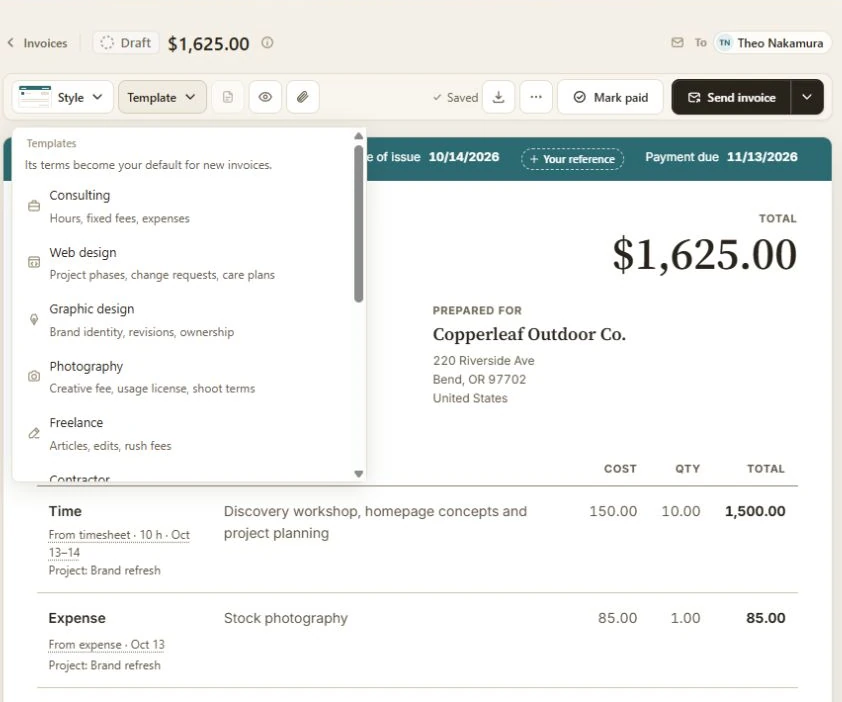
Write the line items, quantities, prices and wording on the invoice. Use Preview to check the paper, and turn on Page breaks to see where a longer document will divide in its PDF.
Open Template on a draft to reuse a past invoice or estimate for this client. Owners and admins can also choose a trade template. Review the replacement before confirming; the client, document number and dates stay with this draft.
Group invoice lines under named sections, so a client can follow the work by phase, service or project. Use saved items for the lines you bill often, with quantities, rates, taxes and discounts.
Add the client's purchase-order or job number with Your reference, beside the issue date. It appears on the document and its PDF, helping the person approving payment match the bill to their records.
Bring work from more than one of a client's projects into the same invoice. Project sections keep it readable, while each line stays connected to the work it bills.
Add unbilled project work to the invoice instead of retyping it. Bring in tracked hours, milestones and recorded expenses. Explore time tracking.
Import expenses from a CSV, check them, then add the billable costs to an invoice. You can also select several recorded expenses to invoice together. See expense imports.
Choose payment terms and a due date. Reuse saved Terms and Notes for your scope, license or payment instructions, then adjust them for this job. Set document defaults.
Choose the invoice currency so prices and the total speak the same language as your agreement. Online card payments support USD, CAD, EUR, GBP and AUD; other payments can be recorded when received.
Several projects. One client.
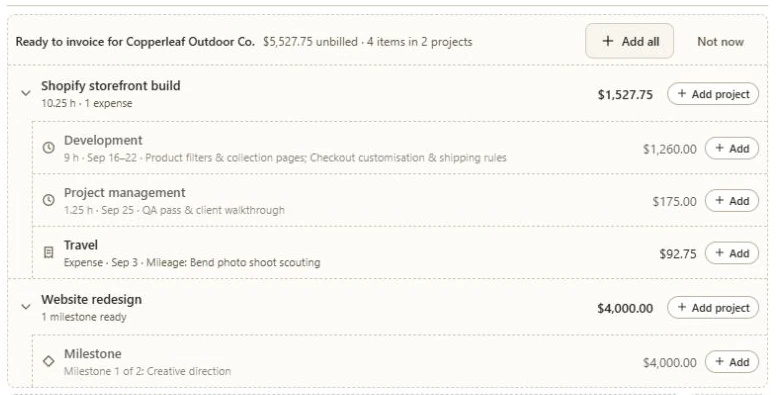
Open Unbilled work on the invoice to review the client's ready time, expenses and milestones by project. Add an individual entry, a project or the full selection. This example has four entries across two projects; each keeps its work type and supporting details.
The work becomes the bill
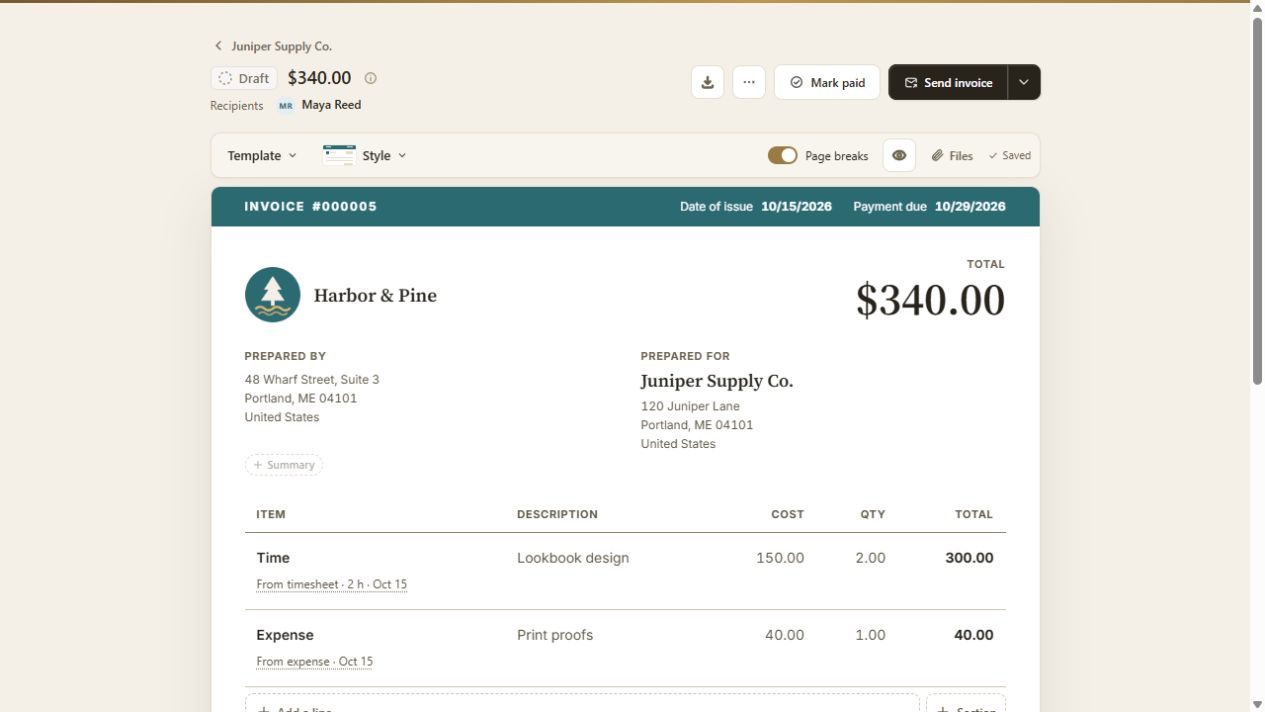
A real BillGrid example for fictional Juniper Supply Co.: two hours of design at $150, plus $40 for print proofs. Review the $340 selection, create the draft, then check the invoice before sending.
Deliver the work
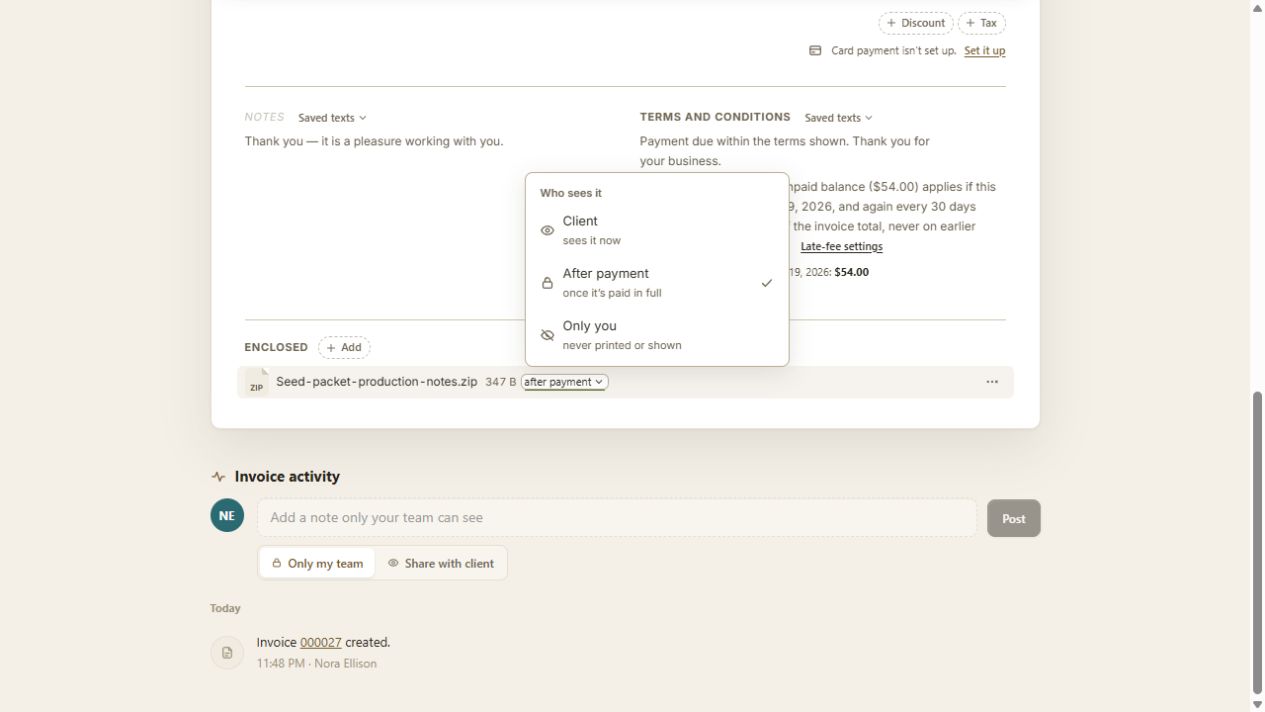
A partial payment does not unlock delivery. For external files, BillGrid controls access to the link on the invoice; permissions on the external service still apply. Read about files and payment access.
No. All four styles, your logo and any brand color are included on every plan, including the $10 Solo plan.
Yes. Settings shows a sample in each style and color. You can also preview the look on an invoice you've already made.
Connect Stripe and enable card payments for eligible invoices in USD, CAD, EUR, GBP or AUD. You can also record payments received by check, cash or bank transfer. See online payments.
The free invoice generator creates and downloads a PDF, up to three a day. Use an invoice template to start with example lines for your work.