Moving from Harvest? Meet BillGrid.

Time tracked.
Ready to bill.

Connect Harvest and see everything it holds before you move. Then run a timer or fill in your timesheet, invoice the hours at their saved rates, and copy supported invoices and payments to QuickBooks Online.

A flat price per login. Nothing charged by usage. Team: $40 a month for four people, $8 per person more. See what a team pays.

QuickBooks Online: Pro and Team, one US company, USD. See what connects.

No card needed to start.

From time tracked to books connected.

Real product details · sample data
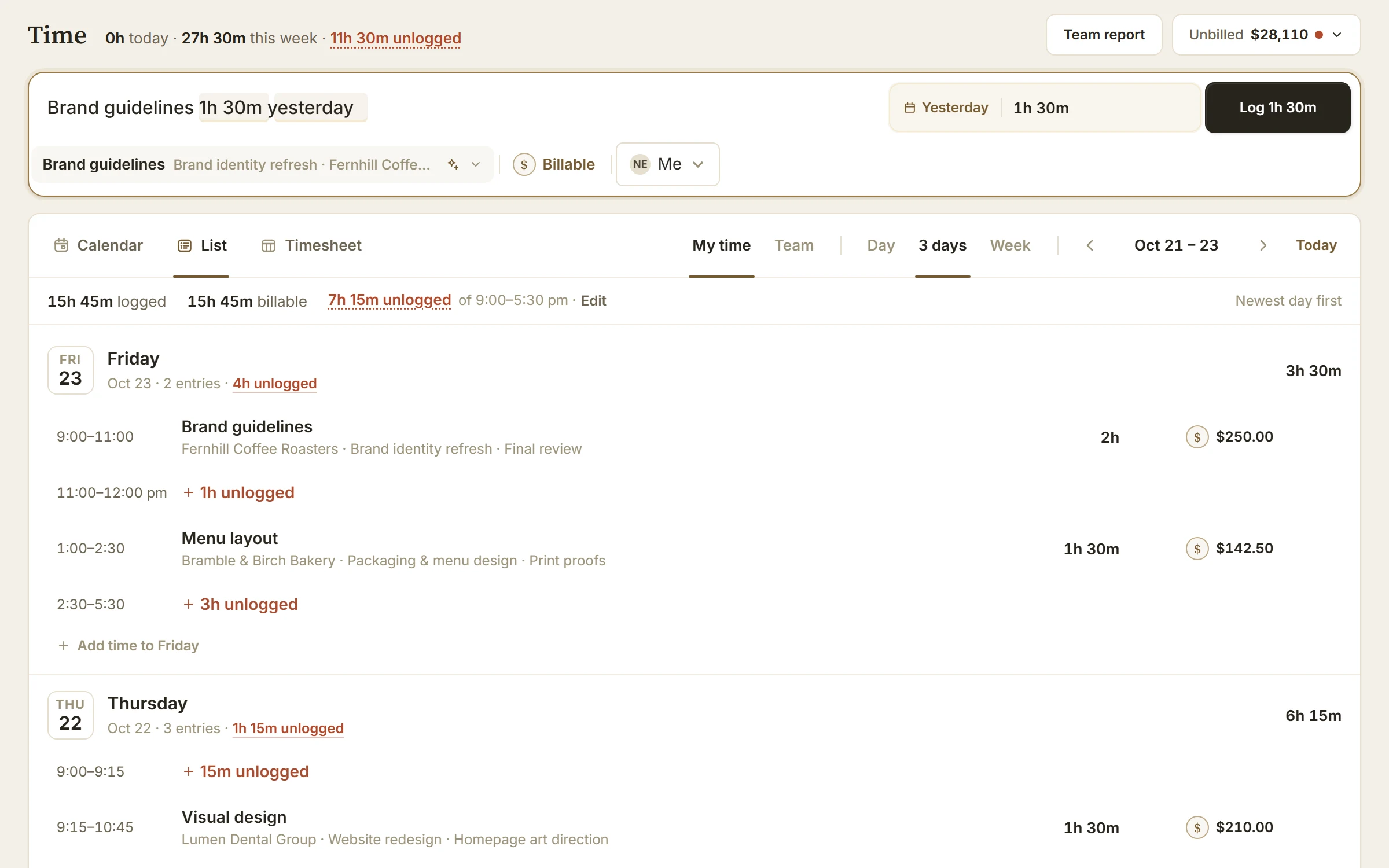
BillGrid reading the line “Brand guidelines 1h 30m yesterday”: yesterday and 1h 30m marked, the Brand guidelines task chosen and Log 1h 30m ready, above the List of the week’s days with their entries, amounts and unlogged time

Type the work. It reads the rest.

One line holds the work, how long and which day; BillGrid marks what it understood before you press Enter. No time given? Enter starts a timer.

The workflows you came to keep

Your time tracking.
Your accounting handoff.

Time tracking

Timer, day or week. Your choice.

Start a project or task timer, or enter the hours later. Keep clients, projects, notes and billable flags with the work.

  • Enter a daily or weekly timesheet across projects.
  • Keep the billing rate saved with each entry; detailed or grouped invoice lines preserve different rates.
  • Review billable time, hourly unbilled value and entries that need a rate in the Team time report.

Explore timers and timesheets · See team reporting

QuickBooks Online · Pro and Team

Choose what reaches your books.

Connect one US company using USD. Choose Manual or Automatic for supported plain service invoices and payments, with a visible review and delivery history.

  • Compare and link records that already exist in both systems.
  • Copy supported payments against linked invoices.
  • Review uncertain matches before they become accounting records.

Check your invoice types. Recurring invoices copy like any other once sent. Not copied yet: tax, discounts, late fees, retainer invoices, expense-linked or sectioned lines, credits and refunds. Payments entered only in QuickBooks do not automatically return to BillGrid. Canadian companies and CAD are not supported.

Check QuickBooks compatibility

BillGrid has no native apps, timesheet approvals, task-based default rates, billing-increment rounding or capacity planning. Before you move.

Beyond the timesheet

Billing that follows
the way you work.

Ongoing client work

A retainer with the hours built in.

Set a monthly or quarterly fee, included hours and carry-over rules. Review extra work before deciding what to bill.

See project retainers
The client experience

Make the invoice feel like your business.

Edit the document itself. Carry your logo and style into the client page and PDF. Keep questions and shared files with the bill.

See invoices and branding
The follow-through

Set the routine. Keep the control.

Schedule reminders, pause one when a client needs time, and stop them when paid. Disclose agreed late fees and choose review or automatic application.

See reminder controls

A practical comparison

Keep what works.
Choose what fits next.

Harvest already connects time and expenses to invoicing. The question is which approach fits your billing, ongoing work and accounting requirements.

Monthly prices before any yearly discount. Harvest Teams is $11 per seat a month.
Your teamBillGridHarvest Teams
3 people$36 on Pro$33 in seats, plus usage
5 people$48 on Team$55 in seats, plus usage
8 people$72 on Team$88 in seats, plus usage

BillGrid charges nothing for invoices, clients or projects. Harvest adds a usage charge for active projects, clients, tasks and invoicing beyond an allowance, and publishes no rate. Some long-time customers reported renewals many times higher; in August 2026 the BBC reported one rising from about $130 to $2,110 a month. Read the full comparison.

Documented workflows checked October 21, 2026. Plan and setup requirements apply.
Your workflowBillGridHarvest
Capture time your wayA typed line, timers, a drag-to-log calendar and weekly timesheets, with your workday’s unlogged time outlined. Time tracking.Timers and day/week entry, plus native apps and calendar integrations. Time tracking.
Invoice tracked hours at their ratesSaved entry rates, billable filters and detailed or grouped draft lines for hourly projects. Time-to-invoice guide.Time and expense invoicing, with project, person or task billing rates. Billing rates.
Review team time and unbilled workBillable/non-billable totals, hourly unbilled value, rate-needed entries and CSV/Excel export. Reports.Detailed time and team reports, plus approval and capacity workflows. Feature guide.
Keep QuickBooks OnlinePro/Team, one US company using USD. Service invoices and payments; Manual or Automatic. Recurring invoices copy like any other once sent. Not copied yet: tax, discounts, late fees, retainer invoices, expense-linked or sectioned lines, credits and refunds. No automatic payment return. Check scope and exclusions.A broader set of invoice types, including expenses, recurring invoices, taxes and discounts; invoice-edit copying and an optional payment-return beta. Check current QBO scope.
A retainer with included hoursMonthly or quarterly fee, optional hours allowance, carry-over and a decision on extra hours. Retainer workflow.Prepaid money applied to eligible invoices; a different retainer model. Retainer guide.
Automatic follow-upBefore, on or after the due date, with pause/skip controls and a stop when paid. Reminder guide.Configurable automatic reminders for overdue invoices, with per-invoice controls. Reminder guide.
Native tracking and team controlsBrowser-based work and billing, with staff/client permissions on eligible plans. Confirm any approval or capacity requirement. Feature guide.Desktop/mobile apps, timesheet approvals and capacity reporting. Harvest may fit better when these are essential. Apps · Approvals.

This compares specific documented workflows, not every feature. Both products have capabilities beyond this table.

Connect Harvest

See it all first.
Then bring it over.

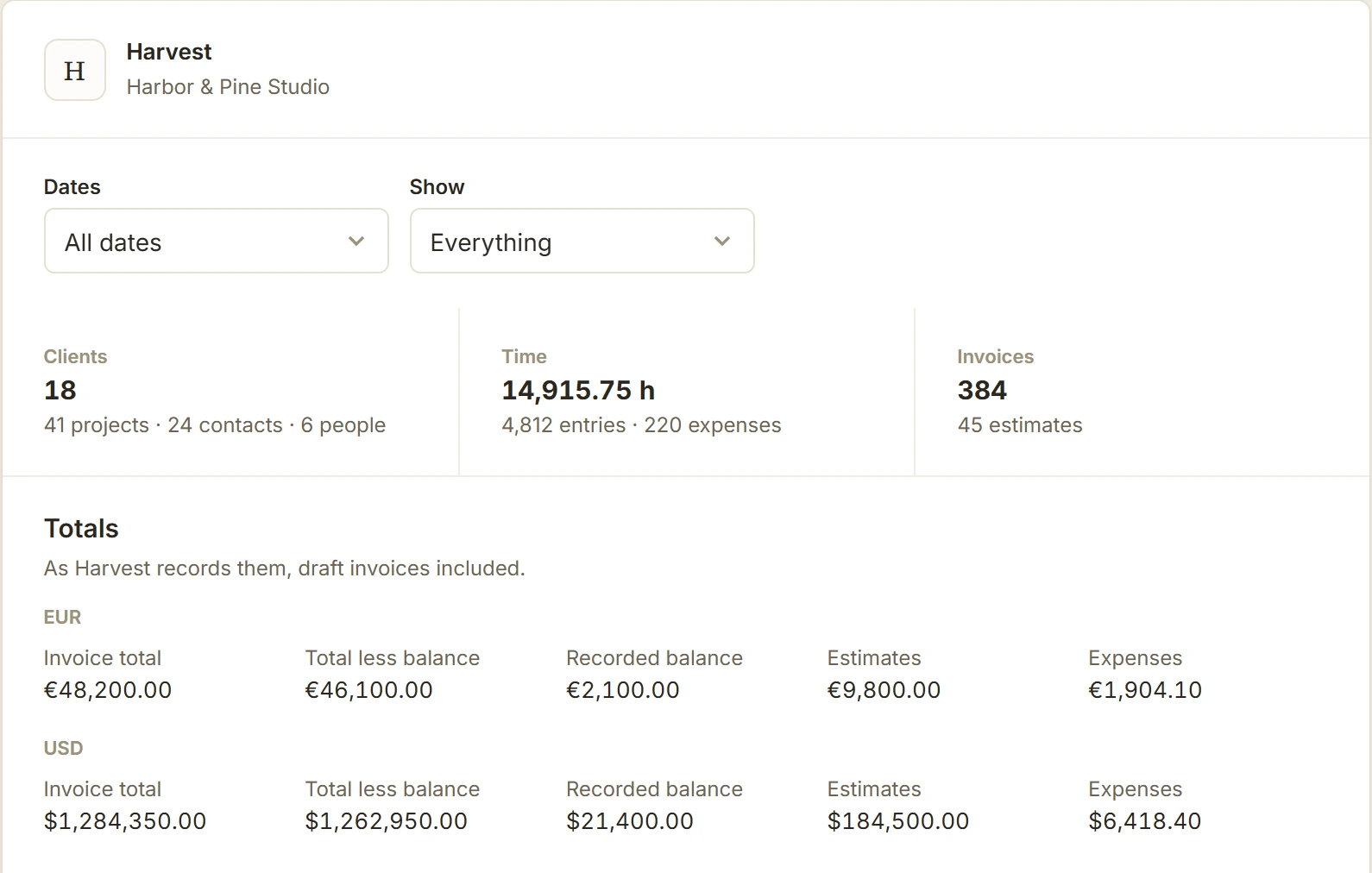
Sign in to Harvest and BillGrid reads your account: clients, projects, people, time, expenses, invoices and estimates, counted, with totals by currency, for any year. Nothing in Harvest changes.

See how importing works
BillGrid's read of a Harvest account: 18 clients, 14,915.75 hours, 384 invoices, with totals in euros and dollars
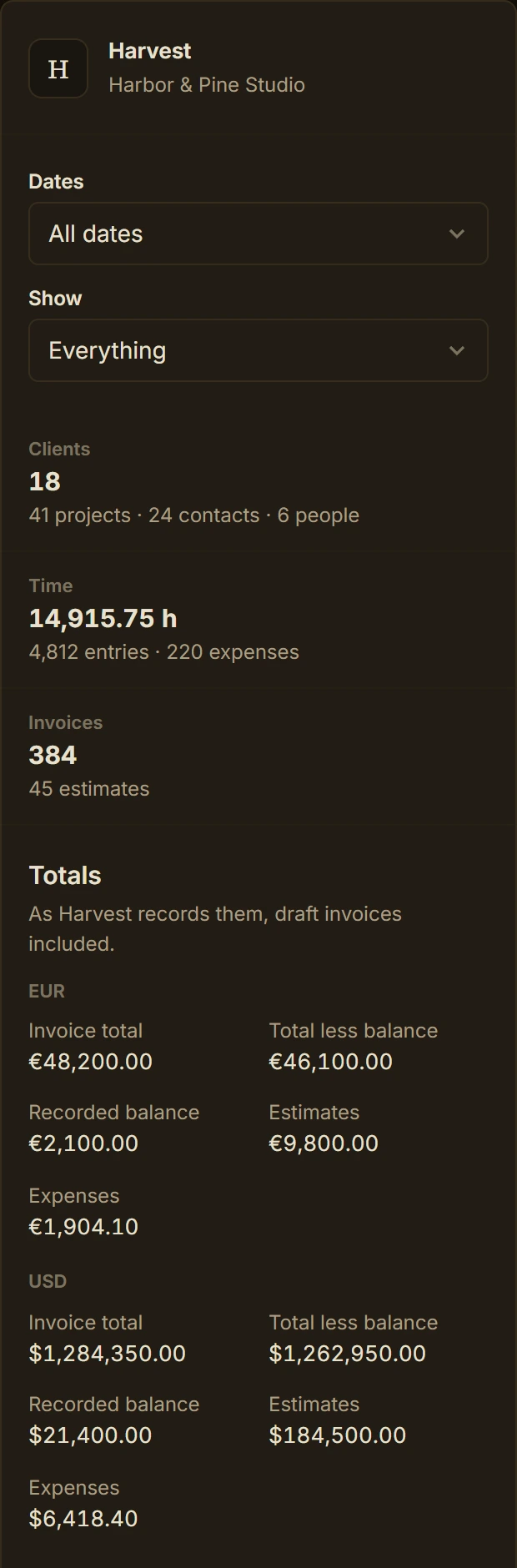
The same Harvest account on a phone, in dark mode
  1. 01

    Connect and read.

    Connect as a Harvest administrator. Years of work are read in minutes, and nothing in Harvest changes.

  2. 02

    Review the matches.

    Link each person, client and project to one you already have, or bring it in new. Nothing is saved until you import.

  3. 03

    Import, then bill.

    Clients, projects, time and expenses come in with their rates; past invoices, estimates and payments come as protected history. Then invoice the unbilled work.

Keep your history. Past invoices, estimates and payments come over as protected history: they can't be sent, charged or edited. Collect invoices still open in Harvest until they're paid. BillGrid stops holding your Harvest access once it's read.

Keep your rates with your work. Each time entry keeps the rate it was billed at, and past teammates come over without a paid seat. Follow the import guide or ask us to check your move.

Staff & contractors

Give your team the work.
Choose who handles the billing.

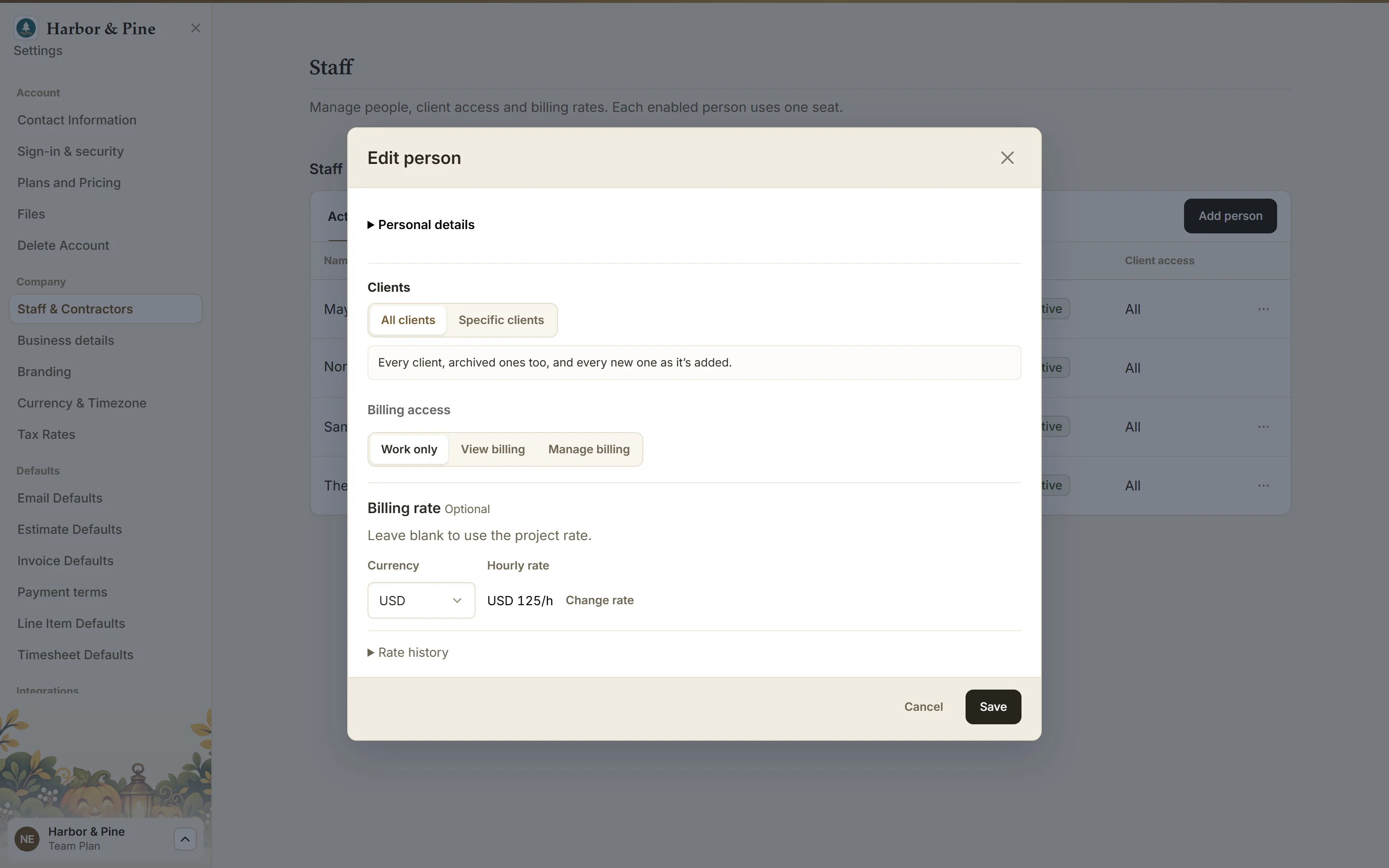
Give teammates their own login and timesheet on Pro and Team. On Team, choose the clients each person works with and whether they work only, see billing or manage it.

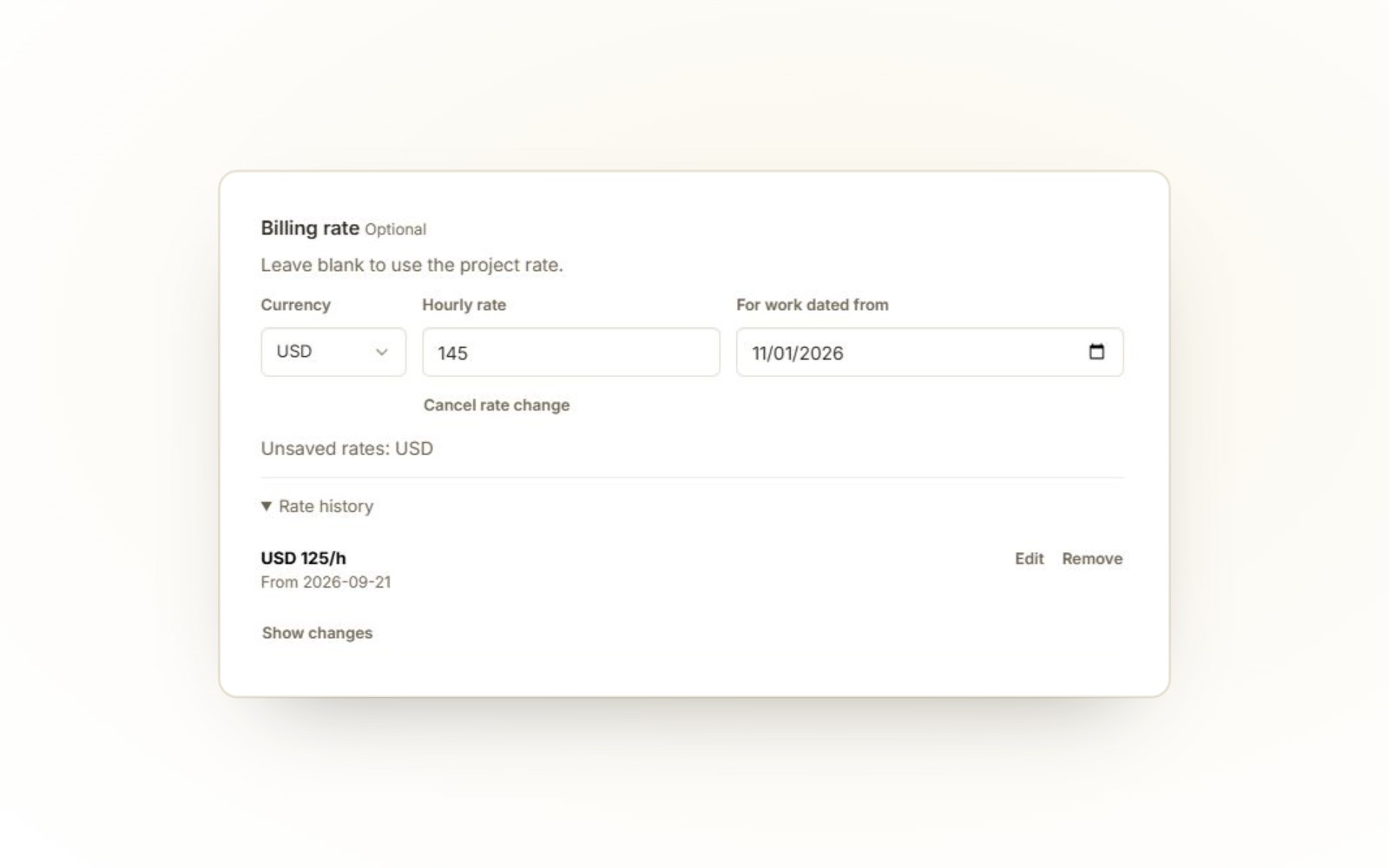
BillGrid staff editor with an unsaved USD 145 hourly rate from November 1 and a saved USD 125 rate in history
Prepare a dated rate change and review its history. Unsaved example. Enlarge detail.

Set the rate. Keep the record.

The account owner can set each person’s hourly billing rate by currency and effective work date, then review the rate history. Saved time keeps its rate when a default changes.

A project-specific rate for that person takes priority; otherwise their staff rate comes before the project default. These are client billing rates, not payroll or wages.

Staff settings with Edit person open for Theo Park: all clients, Work only billing access, and an hourly rate of USD 125
One editor per person: clients, billing access and rate. Enlarge detail.

The right access for the responsibility.

  • Work only: tasks, timers, hours and their own expenses. Client billing amounts stay hidden; their own expense amounts remain visible.
  • Sees money: read billing amounts, invoices, estimates, payments and reports for clients they can reach.
  • Handles money: also create and send invoices and estimates, record payments and manage project billing terms.
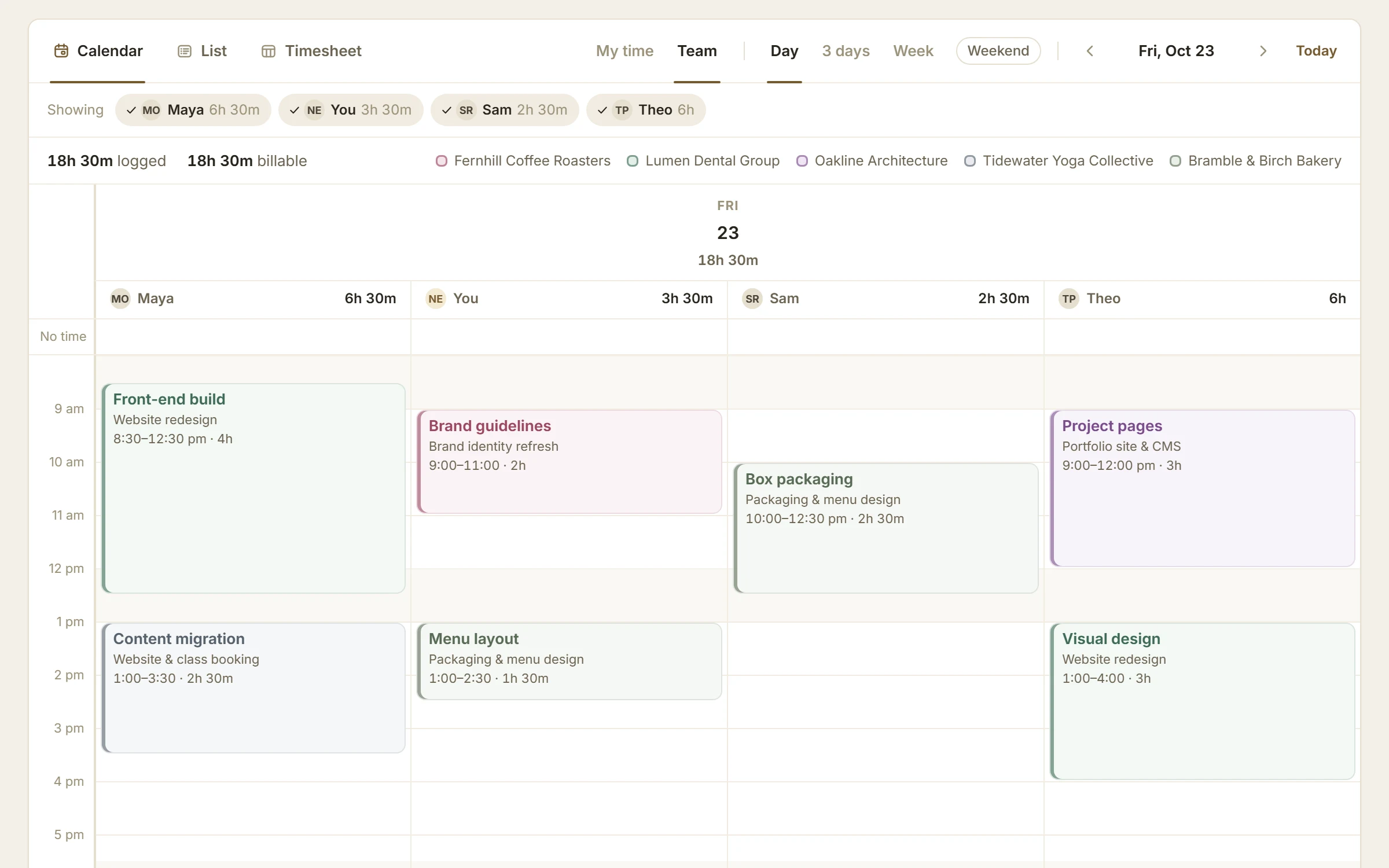
The team’s Friday on BillGrid’s calendar: a lane each for Maya, Nora, Sam and Theo, with their hours and client-colored blocks
Then everyone’s time is in one place. Team shows the day a lane each, or the week as a timesheet with a lane under every task. See the Time page for teams.

A person’s money level applies across every client they can reach. It does not grant staff management, company settings or access to every client. Each enabled person, including a contractor, uses a seat.

Before you move

Check the things
you need to keep.

I need QuickBooks or Xero.

BillGrid’s QuickBooks connection supports one US accounting company using USD, on Pro or Team. Plain service invoices and supported payments can be copied manually or automatically.

Recurring invoices copy like any other once sent. Not copied yet: tax, discounts, late fees, retainer invoices, expense-linked or sectioned lines, credits and refunds. A late fee added to an invoice already in QuickBooks isn't copied: that invoice and its later payments stop syncing and wait in Needs review. Processing fees and payouts aren't copied. Payments entered only in QuickBooks do not automatically return to BillGrid. The expense invoice shown above is not a promise of QuickBooks compatibility. Check your exact bookkeeping case. If Xero is essential, request a fit check before switching.

I need my history and agreed rates.

Connect Harvest to see everything it holds, by year and currency, then keep independent Harvest exports. Check supported clients, projects and current unbilled work, then reconcile hours, rates and totals. Explicit rates from the detailed time export are kept with each entry. Review missing rates and staff matching; past invoices, estimates and payments come over as protected history. Read the moving guide.

I need task rates or billing-increment rounding.

BillGrid uses saved entry rates, with project-person, staff and project defaults for new time. Task-based default rates need a fit check. Invoice hours use two-decimal precision rather than rounding to a 6-, 15- or 30-minute increment. Check time and billing rules.

I need native timers, approvals or capacity reports.

Harvest has dedicated apps and team workflows that may be important to you. BillGrid is a browser-based billing workspace. If your team depends on approval locking or capacity planning, Harvest is likely the better fit.

Recognize your workflow? Try a real billing cycle before deciding.

Start your 30-day trial

Already paid for Harvest?

Ask us to bridge
the prepaid overlap.

For eligible new businesses, request free BillGrid base-plan access through your verified prepaid Harvest end date, up to six months from activation.

Subject to eligibility and manual review. The normal 30-day trial is included in the six-month cap. Extra seats, extra storage and payment processing are excluded. No cash reimbursement.

Sending a request does not change your BillGrid trial, plan or billing. Wait for written approval of the coverage and dates before relying on an extension.

Try the work before you move the business.
One project. One draft invoice. Your own decision.

Try BillGrid for 30 days

BillGrid is an independent product and is not affiliated with Harvest.

Full-size screenshot